# User request notifications

{% hint style="success" %}
**Access Type**: Admin

**Premium Feature**: DSAR
{% endhint %}

In order to be informed about user requests, your organization can configure notifications to be delivered to one or more members of your team when a user request ticket is created and nearly expired.&#x20;

* [User request notification types](#user-request-notification-types)
* [Configure user request notifications](#configure-user-request-notifications)

***

### User request notification types

Didomi will send the following emails to any user in organization configured to receive a user request notification:

{% hint style="info" %}
Currently, it is not possible to select what type of notification a user in your organization will receive. Configured users will receive both types of notifications.
{% endhint %}

<table><thead><tr><th width="234">Notification type</th><th>Description</th></tr></thead><tbody><tr><td>User request created</td><td>Notification delivered whenever a new request ticket is created (either via privacy request widget or API).</td></tr><tr><td>User request about to expire </td><td>Notification delivered when one or more privacy requests are less than 10 days from expiring.</td></tr></tbody></table>

### Configure user request notifications

To configure the users in your organization who will receive the user request notifications, click **Privacy Requests** on the left-hand panel and select the **gear icon** inline with the page title.

<figure><img src="/files/SyNroyS6qWipvVq5qFwE" alt="" width="563"><figcaption></figcaption></figure>

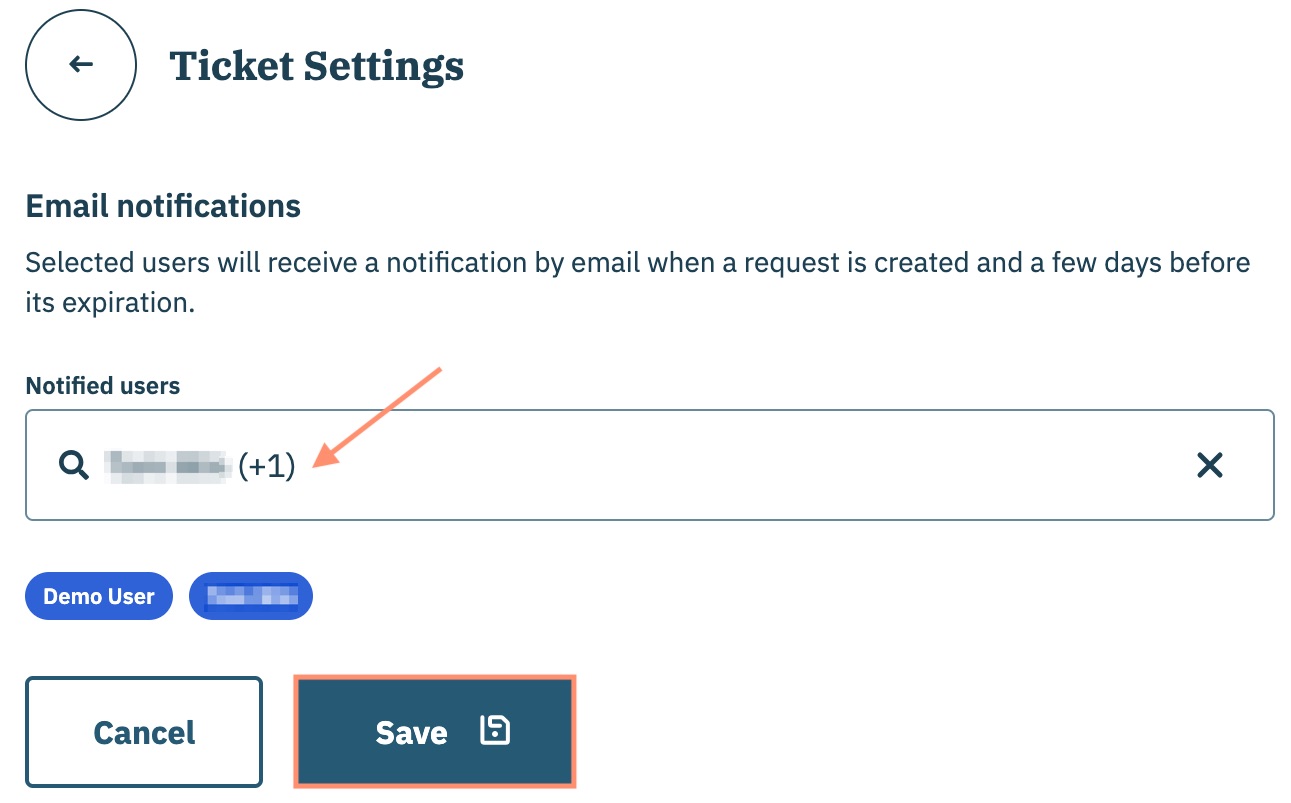
On the subsequent page, navigate to the **Notified users** drop-down menu and select the users in your organization that will receive the user request notifications.&#x20;

Click **Save** to confirm.

<figure><img src="/files/xly6sRbaWHiEALXrqO3j" alt="" width="375"><figcaption></figcaption></figure>


---

# Agent Instructions: Querying This Documentation

If you need additional information that is not directly available in this page, you can query the documentation dynamically by asking a question.

Perform an HTTP GET request on the current page URL with the `ask` query parameter:

```
GET https://docs.didomi.io/privacy-requests/user-requests/user-request-notifications.md?ask=<question>
```

The question should be specific, self-contained, and written in natural language.
The response will contain a direct answer to the question and relevant excerpts and sources from the documentation.

Use this mechanism when the answer is not explicitly present in the current page, you need clarification or additional context, or you want to retrieve related documentation sections.