> For the complete documentation index, see [llms.txt](https://docs.didomi.io/llms.txt). Markdown versions of documentation pages are available by appending `.md` to page URLs; this page is available as [Markdown](https://docs.didomi.io/preference-management-platform-pmp/configuration-tree/manage-preferences-in-configuration-tree.md).
# Manage preferences in configuration tree
{% hint style="success" %}
**Access Type:** Configuration Tree - Editor
**Premium Feature**: Preference Management Platform
{% endhint %}
The PMP configuration tree is the data model configured by your organization which defines the relationship between preferences (end-user data collected) and the purposes for which your organization is collecting this information. After your organization has [added a purpose](/preference-management-platform-pmp/configuration-tree/add-purpose-to-configuration-tree.md) to the PMP configuration tree you can continue to map preferences to the purpose.
In this article, we will cover the following:
* [Add preference to purpose in configuration tree](#add-preference-to-purpose-in-configuration-tree)
* [Remove preference from purpose in configuration tree](#remove-preference-from-purpose-in-configuration-tree)
* [Nest preference under another preference in configuration tree](#nest-preference-under-another-preference-in-configuration-tree)
{% hint style="info" %}
Only preferences mapped to a purpose in your configuration tree can be added to a preferences widget.
{% endhint %}
To start, click **Preferences** on the left-hand panel and then select the Configuration Tree tab on the subsequent page.
***
### Add preference to purpose in configuration tree
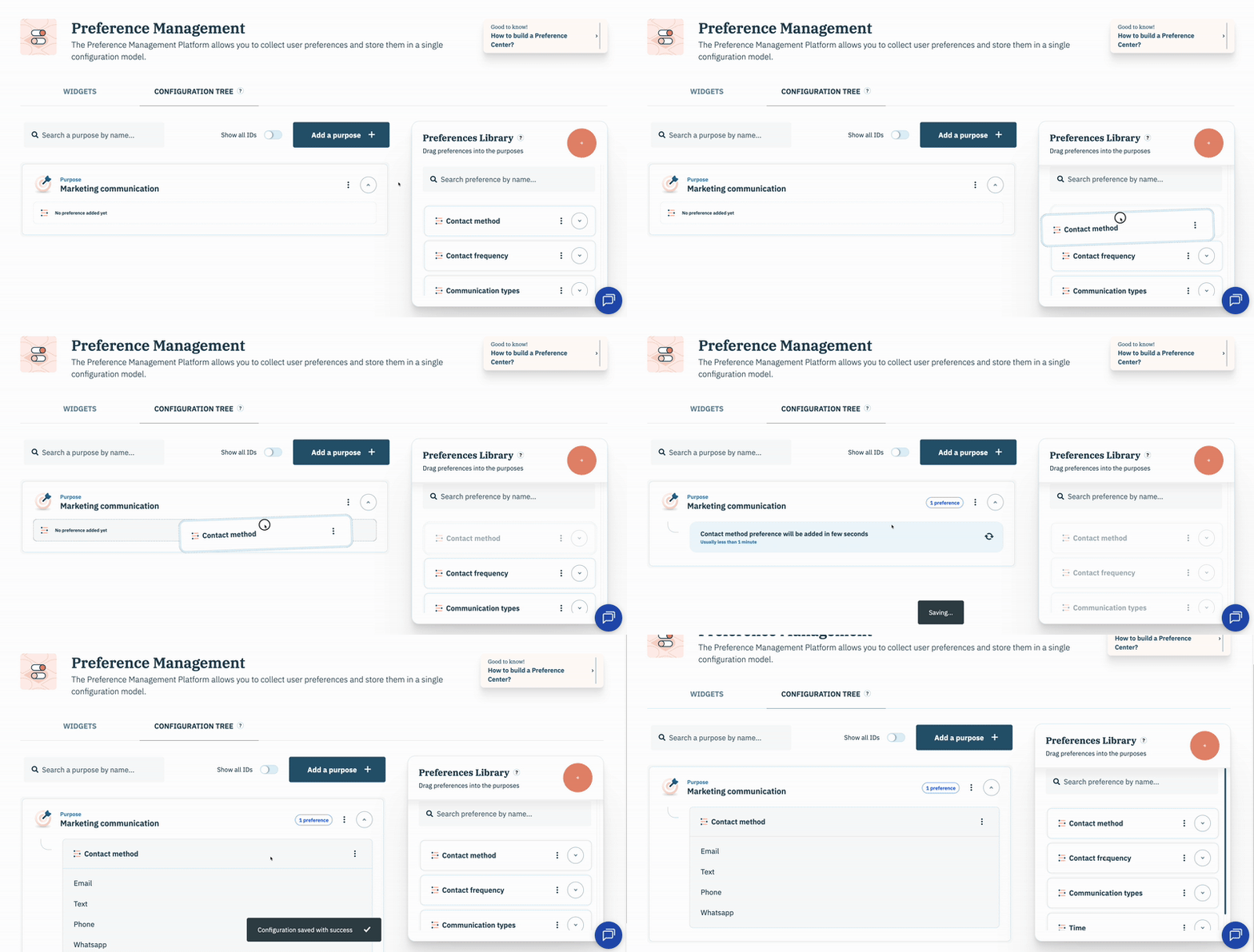
Add a preference to a purpose in your organization's PMP configuration tree by selecting the preference from the preference library and dragging it to the desired purpose within your configuration tree.
### Remove preference from purpose in configuration tree
Remove a preference from a purpose in your organization's PMP configuration tree by navigating to the preference in the configuration tree and selecting the **ellipsis** inline with the preference name.
Click **Remove** from the subsequent menu.
### Nest preference under another preference in configuration tree
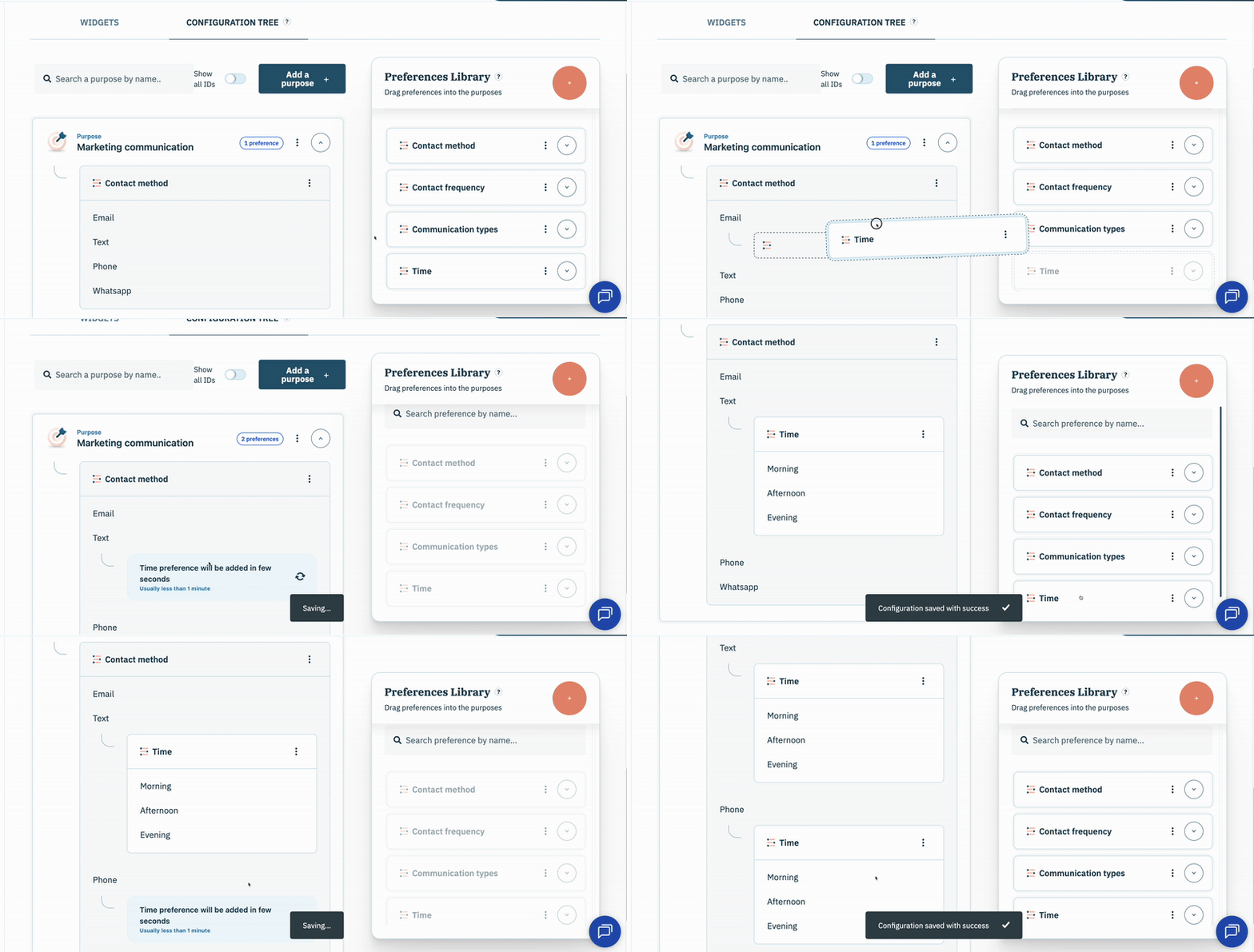
Nesting a preference under another preference lets your organization to collect more granular end-user preference data based on the value options of the top-level preference (*e.g. if a preference asks the end-user for methods of contact, your organization may want to ask the preferred time of contact for each method of contact*).
{% hint style="info" %}
Generally, when using nested preferences in your PMP configuration tree your organization will want to utilize the multi purpose format for you preferences widget so that the nested preference can also be added to the preferences widget.
{% endhint %}
To nest a preference under another preference in your organization's PMP configuration tree, select the preference from the preference library and drag it to the desired value option for a purpose within your configuration tree.
---
# Agent Instructions
This documentation is published with GitBook. GitBook is the documentation platform designed so that both humans and AI agents can read, navigate, and reason over technical content effectively. Learn more at gitbook.com.
## Querying This Documentation
If you need additional information that is not directly available in this page, you can query the documentation dynamically by asking a question.
Perform an HTTP GET request on the current page URL with the `ask` query parameter, and the optional `goal` query parameter:
```
GET https://docs.didomi.io/preference-management-platform-pmp/configuration-tree/manage-preferences-in-configuration-tree.md?ask=&goal=
```
`ask` is the immediate question: it should be specific, self-contained, and written in natural language.
`goal` is optional and describes the broader end goal you are ultimately trying to accomplish on behalf of the user. GitBook uses it to tailor the answer towards what is most useful for that goal.
The response will contain a direct answer to the question and relevant excerpts and sources from the documentation.
Use this mechanism when the answer is not explicitly present in the current page, you need clarification or additional context, or you want to retrieve related documentation sections.