# Configure processing rule for PMP purpose

{% hint style="success" %}
**Access Type**: Configuration Tree - Editor

**Premium Feature**: Preference Management Platform
{% endhint %}

A processing rule defines the initial state of a purpose before the end-user has made a choice. By defining the processing rule for a purpose within the PMP configuration tree your organization is setting whether the purpose opted-into (accepted) or opted-out of (rejected) when an end-user views the preferences widget for the first time. In this article, we will cover the following

* [Processing rule overview](#processing-rule-overview)
* [Impact on purpose single purpose widget layout](#impact-on-purpose-single-purpose-widget-layout)
* [Configure processing rule for PMP purpose](#configure-processing-rule-for-pmp-purpose)

***

### Processing rule overview

Processing rules only apply to purposes within your organization's configuration tree and only define the initial consent state of a purpose. Refer to the table below for more information on the different processing rules you can configure for a PMP purpose:

<table><thead><tr><th width="233">Processing rule</th><th>Description</th></tr></thead><tbody><tr><td>Opt-in (default)</td><td>Purpose starts not selected and end-users have to explicitly opt-in if they agree.</td></tr><tr><td>Opt-out</td><td>Purpose starts selected and end-users have to explicitly opt-out if they disagree.</td></tr></tbody></table>

{% hint style="warning" %}
**Note**: By default, the processing rule for every purpose in your PMP configuration tree is Opt-in unless otherwise edited.&#x20;
{% endhint %}

Once an end-user saves their selections, the end-user’s choices always take precedence and the processing rule stops applying for that end-user.

### Impact on purpose single purpose widget layout

For your convenience, Didomi as collated how configuring the processing rule for a purpose will change the presentation of the purpose for each single purpose widget layout.

| Widget layout          | Opt-in (default)              | Opt-out                                            |
| ---------------------- | ----------------------------- | -------------------------------------------------- |
| Radio buttons          | No option selected            | The **Yes** button is preselected for the end-user |
| Single checkbox        | Unchecked                     | Checkbox is preselected for the end-user           |
| Tap to change sentence | Default Opt-in sentence shown | Default Opt-out sentence is shown                  |

### Configure processing rule for PMP purpose

Processing rules are configured on a per-purpose basis within your organization's configuration tree and do not apply to preferences.

{% hint style="warning" %}
**Note**: Processing rules for a purpose cannot be adjusted for each preferences widget on which it is included. If processing rules need to vary by preferences widget we recommend creating separate purposes to account for the difference in processing rules.
{% endhint %}

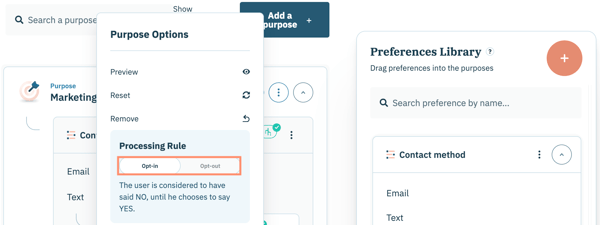
In order to configure a processing rule for apurpose in your configuration tree, click **Preferences** on the left-hand panel and select the **Configuration Tree** tab on the subsequent page.

<figure><img src="/files/EQDZykjhXlMudN4pfd2f" alt="" width="563"><figcaption></figcaption></figure>

Navigate to a specific purpose within the configuration tree and click the ellipsis inline with the purpose name.

Select the processing rule you wish to set for the purpose.

<img src="https://support.didomi.io/hs-fs/hubfs/Screenshot%202025-11-19%20at%2011-53-38%E2%80%AFAM-png.png?width=600&#x26;height=226&#x26;name=Screenshot%202025-11-19%20at%2011-53-38%E2%80%AFAM-png.png" alt="" width="563">

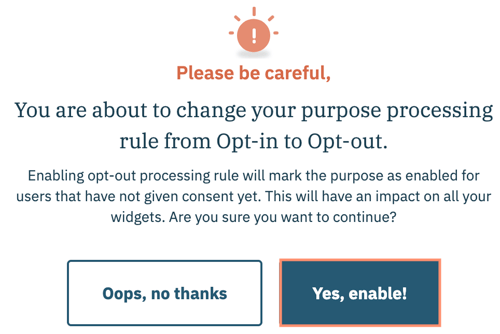
If required, confirm the decision to change the processing rule in the subsequent modal and click **Yes, enable!**

<figure><img src="https://support.didomi.io/hs-fs/hubfs/Screenshot%202025-11-19%20at%2012-02-13%E2%80%AFPM-png.png?width=500&#x26;height=334&#x26;name=Screenshot%202025-11-19%20at%2012-02-13%E2%80%AFPM-png.png" alt="" width="375"><figcaption></figcaption></figure>

In order to reflect a change of processing rule for a purpose on a published preferences widget your organization will need to republish the preferences widget.

<img src="https://support.didomi.io/hs-fs/hubfs/Screenshot%202025-11-19%20at%2012-04-40%E2%80%AFPM-png.png?width=600&#x26;height=85&#x26;name=Screenshot%202025-11-19%20at%2012-04-40%E2%80%AFPM-png.png" alt="" width="563">

{% hint style="info" %}
Updating the processing rule for a purpose will not change any existing end-user choices.&#x20;
{% endhint %}


---

# Agent Instructions: Querying This Documentation

If you need additional information that is not directly available in this page, you can query the documentation dynamically by asking a question.

Perform an HTTP GET request on the current page URL with the `ask` query parameter:

```
GET https://docs.didomi.io/preference-management-platform-pmp/configuration-tree/configure-processing-rule-for-pmp-purpose.md?ask=<question>
```

The question should be specific, self-contained, and written in natural language.
The response will contain a direct answer to the question and relevant excerpts and sources from the documentation.

Use this mechanism when the answer is not explicitly present in the current page, you need clarification or additional context, or you want to retrieve related documentation sections.