# Configure preselected preferences for purpose consent

{% hint style="success" %}
**Access Type**: Configuration Tree - Editor

**Premium Feature**: Preference Management Platform
{% endhint %}

One-click consent is a Didomi Preference Management Platform (PMP) setting that allows your organization to automatically select all preference values for multi-selection preferences when an end-user accepts (provides positive consent) for its parent purpose. In this article, we will cover the following:

* [One-click consent overview](#one-click-consent-overview)
* [Enable one-click consent for purpose](#enable-one-click-consent-for-purpose)

***

### One-click consent overview

One-click consent is not enabled by default and instead is enabled on a per-purpose basis within your configuration tree.&#x20;

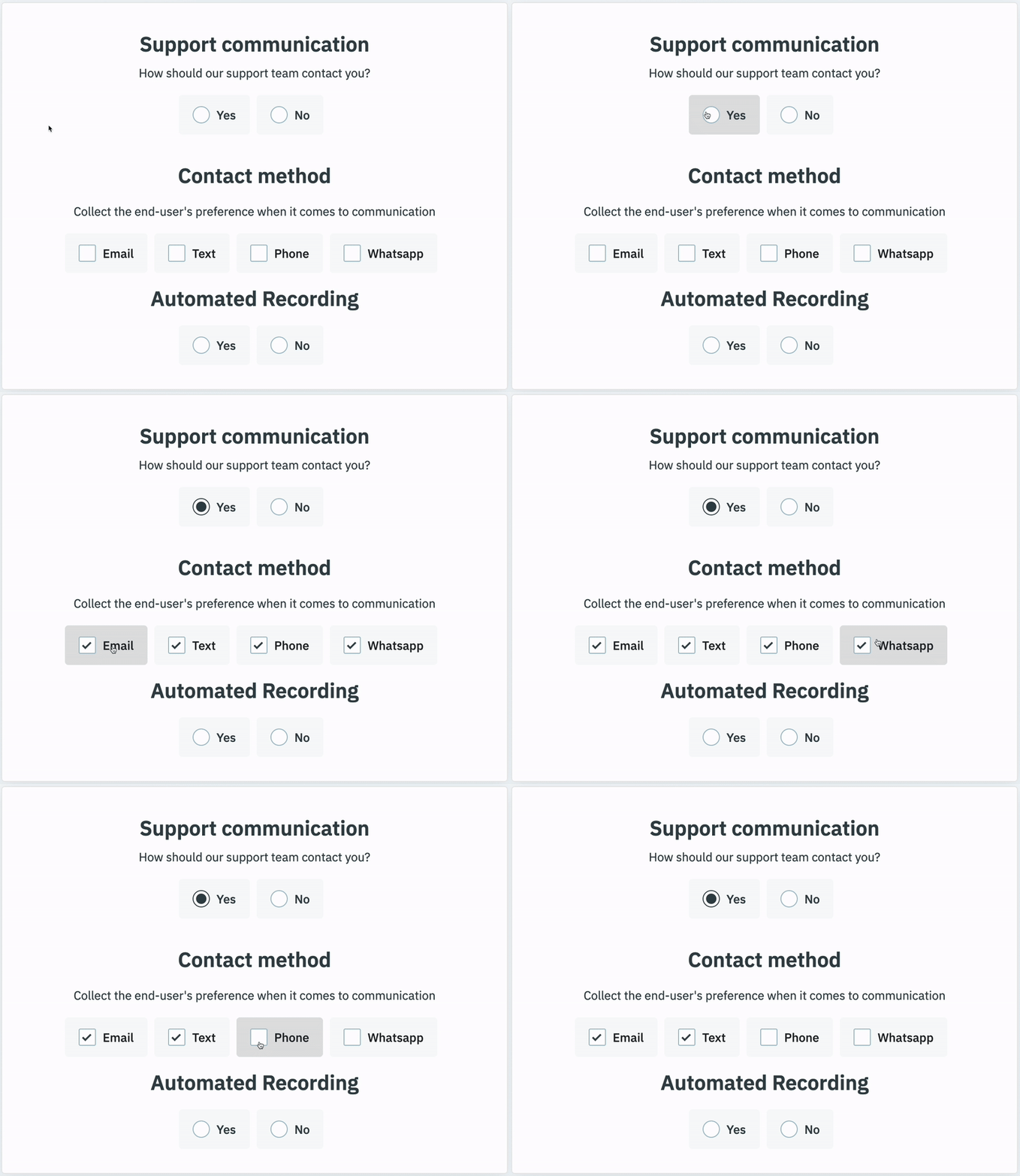
When one-click consent is enabled and configured for a purpose, whenever an end-user accepts that purpose (positive consent), all preference values for multi-selection preferences will also be automatically selected.&#x20;

{% hint style="info" %}
The one-click consent setting is only available for preferences with a selection type of **multi-selection** (end-users can make multiple choices for the preference).
{% endhint %}

End-users can continue to edit preference value selections after accepting a one-click consent purpose (i.e. end-users can deselect preference values included in the propagation).

<figure><img src="/files/6iQ1yPiXcPcV8AbJgPin" alt="" width="375"><figcaption></figcaption></figure>

{% hint style="warning" %}
**Note**: Toggling a one-click consent purpose will reset any preference value selections.&#x20;
{% endhint %}

Review the table below for how preference selections are displayed and saved:

<table><thead><tr><th width="246">Widget format</th><th>Description</th></tr></thead><tbody><tr><td>Single purpose widget</td><td>Once the purpose is consented by the end-user the preselected preference values will be saved when the end-user submits their preference via the <strong>Save</strong> button.</td></tr><tr><td>Multi purpose widget</td><td>Once the purpose is consented by the end-user the preselected preference values will be visible in the preferences widget and saved when the end-user submits their preference via the <strong>Save</strong> button.</td></tr></tbody></table>

### Enable one-click consent for purpose

In order to enable one-click consent for a purpose in your configuration tree, click **Preferences** on the left-hand panel and select the **Configuration Tree** tab on the subsequent page.

<img src="/files/EQDZykjhXlMudN4pfd2f" alt="" width="563">

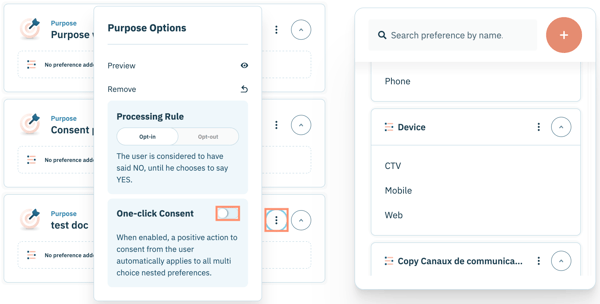
Navigate to a specific purpose within the configuration tree and click the ellipsis inline with the purpose name.

Enable the toggle inline with **One-click Consent**.
<img src="https://support.didomi.io/hs-fs/hubfs/Screenshot%202025-11-19%20at%208-38-52%E2%80%AFAM-png.png?width=600&#x26;height=305&#x26;name=Screenshot%202025-11-19%20at%208-38-52%E2%80%AFAM-png.png" alt="" width="563">

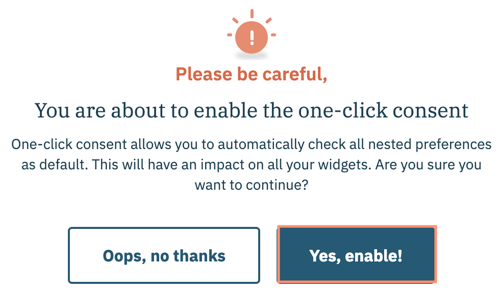
Confirm your decision to enable one-click consent for the purpose in the subsequent modal and click **Yes, enable!**
<figure><img src="https://support.didomi.io/hs-fs/hubfs/Screenshot%202025-11-19%20at%208-41-07%E2%80%AFAM-png.png?width=500&#x26;height=292&#x26;name=Screenshot%202025-11-19%20at%208-41-07%E2%80%AFAM-png.png" alt="" width="375"><figcaption></figcaption></figure>

The purpose will be set as a one-click consent purpose.

{% hint style="info" %}
The purpose update will automatically reflect in your published preferences widgets. Any existing end-user preference selections related to the purpose **will not** be updated to reflect the one-click consent purpose.
{% endhint %}

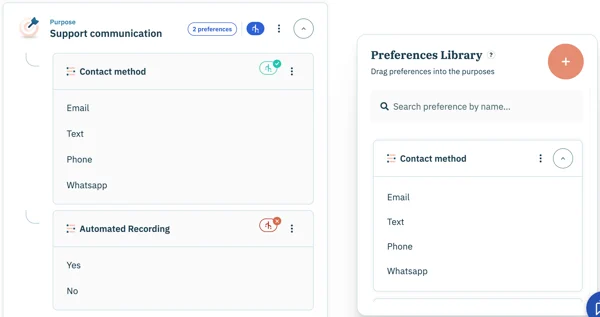
From the configuration tree and the purposes & preferences tab of the preferences widget configuration flow, icons will indicate the status of each purpose and/or preference in regards to one-click consent.

<table><thead><tr><th width="235">Icon</th><th>Description</th></tr></thead><tbody><tr><td>Blue</td><td>Indicates purpose has one-click consent enabled</td></tr><tr><td>Green</td><td>Indicates preference is a multi-selection preference and will have all its preferences values selected if purpose is accepted (positive consent)</td></tr><tr><td>Red</td><td>Indicates preference is a mono-selection preference and is not impacted by one-click consent for the purpose</td></tr></tbody></table>

<figure><img src="/files/x3S19ZhDQwddiMK6gb72" alt=""><figcaption></figcaption></figure>


---

# Agent Instructions: Querying This Documentation

If you need additional information that is not directly available in this page, you can query the documentation dynamically by asking a question.

Perform an HTTP GET request on the current page URL with the `ask` query parameter:

```
GET https://docs.didomi.io/preference-management-platform-pmp/configuration-tree/configure-preselected-preferences-for-purpose-consent.md?ask=<question>
```

The question should be specific, self-contained, and written in natural language.
The response will contain a direct answer to the question and relevant excerpts and sources from the documentation.

Use this mechanism when the answer is not explicitly present in the current page, you need clarification or additional context, or you want to retrieve related documentation sections.