# Single Sign-On (SSO)

{% hint style="success" %}
**Premium Feature**: SSO
{% endhint %}

Single Sign-On (SSO) is an authentication process that allows users to access multiple applications or systems with one set of login credentials. Some benefits of SSO include:

<table data-header-hidden><thead><tr><th width="258"></th><th></th></tr></thead><tbody><tr><td>Security</td><td>Ensures better security of user credentials by providing a standardized and unique method of identification.</td></tr><tr><td>Simplified user management</td><td>A single source (identity provider) where access to applications for users in your organization is managed.</td></tr><tr><td>Improved user experience</td><td>Eliminate credential management fatigue.</td></tr></tbody></table>

The two main protocols used for SSO are:

* [SAML (Security Assertion Markup Language)](#saml-2.0)
* [OAuth 2.0](#oauth-2.0)

{% hint style="info" %}
Didomi only supports SSO based on SAML 2.0 standard protocol.
{% endhint %}

{% tabs %}
{% tab title="SAML 2.0" %}
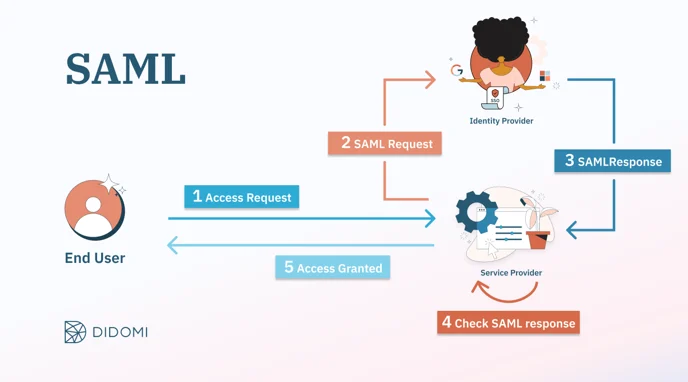
SAML (Security Assertion Markup Language) is an open standard for exchanging authentication and authorization data between parties. SAML is extensively used by enterprises and governments for sharing identity data in a highly secure manner.&#x20;

The service provider and the identity provider build a trusted relationship, where the user identity is transferred using signed SAML messages instead of passwords. Data is transferred in XML structure, through HTTP or SOAP mechanisms.

<figure><img src="/files/FPJ6RQCjaKGnaeGKemnx" alt=""><figcaption></figcaption></figure>
{% endtab %}

{% tab title="OAuth 2.0" %}
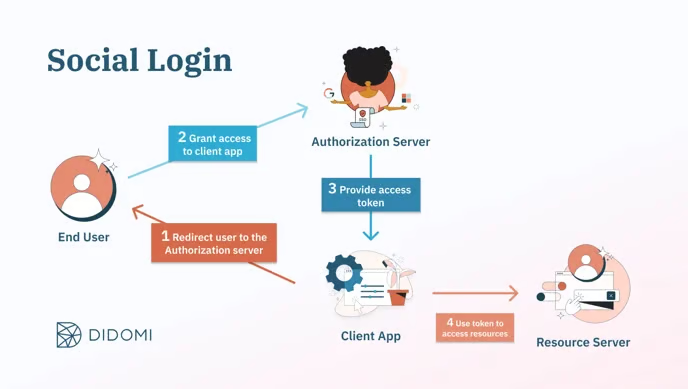
OAuth 2.0 is an industry-standard authorization framework that enables a third-party application to access limited user data from another service. The authorization server provides the client app with an access token for a specific list of resources. The client app will then use this token to access the authorized resources.

Social Login, for example, is a use case that utilizes the OAuth 2.0 protocol. It consists of reusing the existing credentials from a social network like Google, Microsoft, etc.

The user can sign in to their social network account without the need to go through the creation flow to simplify registration and logins.

<figure><img src="/files/DfEnLe1ZMqOOnkjCNFPp" alt=""><figcaption></figcaption></figure>
{% endtab %}
{% endtabs %}

For your convenience, Didomi has compiled the following table to compare the differences between SAML and OAuth 2.0 (e.g. Social Login):

<table><thead><tr><th width="212"></th><th>SAML</th><th>OAuth 2.0 (Social Login)</th></tr></thead><tbody><tr><td>Use case</td><td>Used for authentication into a workspace. System administrators can enforce and control authentication means of their users (e.g. multi-factor authentication).</td><td>Used by individual users to login with their social network account.</td></tr><tr><td>Security</td><td><p>Based on signed SAML messages which is more secure than the OAuth 2.0 social login.</p><p>SAML responses are digitally signed. They detect data manipulation in transit and can be encrypted if transport encryption (HTTPS) is insufficient.</p></td><td>Based on HTTP/HTTPS redirects only.</td></tr><tr><td>Purpose</td><td>SAML is a matter of both authentication and authorization. It verifies a user's identity and permissions in order to grant or deny the access to a given application.</td><td>Social login is a matter of authorization. It controls authorization to a protected resource such as an application or a set of files</td></tr></tbody></table>


---

# Agent Instructions: Querying This Documentation

If you need additional information that is not directly available in this page, you can query the documentation dynamically by asking a question.

Perform an HTTP GET request on the current page URL with the `ask` query parameter:

```
GET https://docs.didomi.io/organization-and-account-settings/single-sign-on-sso.md?ask=<question>
```

The question should be specific, self-contained, and written in natural language.
The response will contain a direct answer to the question and relevant excerpts and sources from the documentation.

Use this mechanism when the answer is not explicitly present in the current page, you need clarification or additional context, or you want to retrieve related documentation sections.