# Web Pageviews dashboard

{% hint style="success" %}
**Access Type**: Analytics - Viewer
{% endhint %}

The Web Pageviews dashboard in Didomi CMP analytics enables your organization to view [CMP traffic scope](https://docs.didomi.io/moIvfcA7NSpjmwGZ7dzv/analytics/cmp-metrics/cmp-metric-glossary#cmp-traffic-scope) metrics across domains, countries, devices and operating systems. In this article, we will provide a brief overview of the data and visualizations found in the Web Pageviews dashboard.

* [Web Pageviews dashboard filters](#web-pageviews-dashboard-filters)
* [Web Pageviews dashboard data and visualizations](#web-pageviews-dashboard-data-and-visualizations)

To start, click **Analytics** on the left-hand panel and select the **Web Pageviews** card on the subsequent page.

<figure><img src="https://1825037175-files.gitbook.io/~/files/v0/b/gitbook-x-prod.appspot.com/o/spaces%2FNDxbAdc00ce6bH5u1urh%2Fuploads%2FJPTKPHYh2kBYaQ3g5qsY%2FScreenshot%202026-02-17%20at%2010.43.16%E2%80%AFAM.png?alt=media&#x26;token=35e48a1d-7ca3-4081-a652-a258f71eb07a" alt="" width="563"><figcaption></figcaption></figure>

***

### Web Pageviews dashboard filters

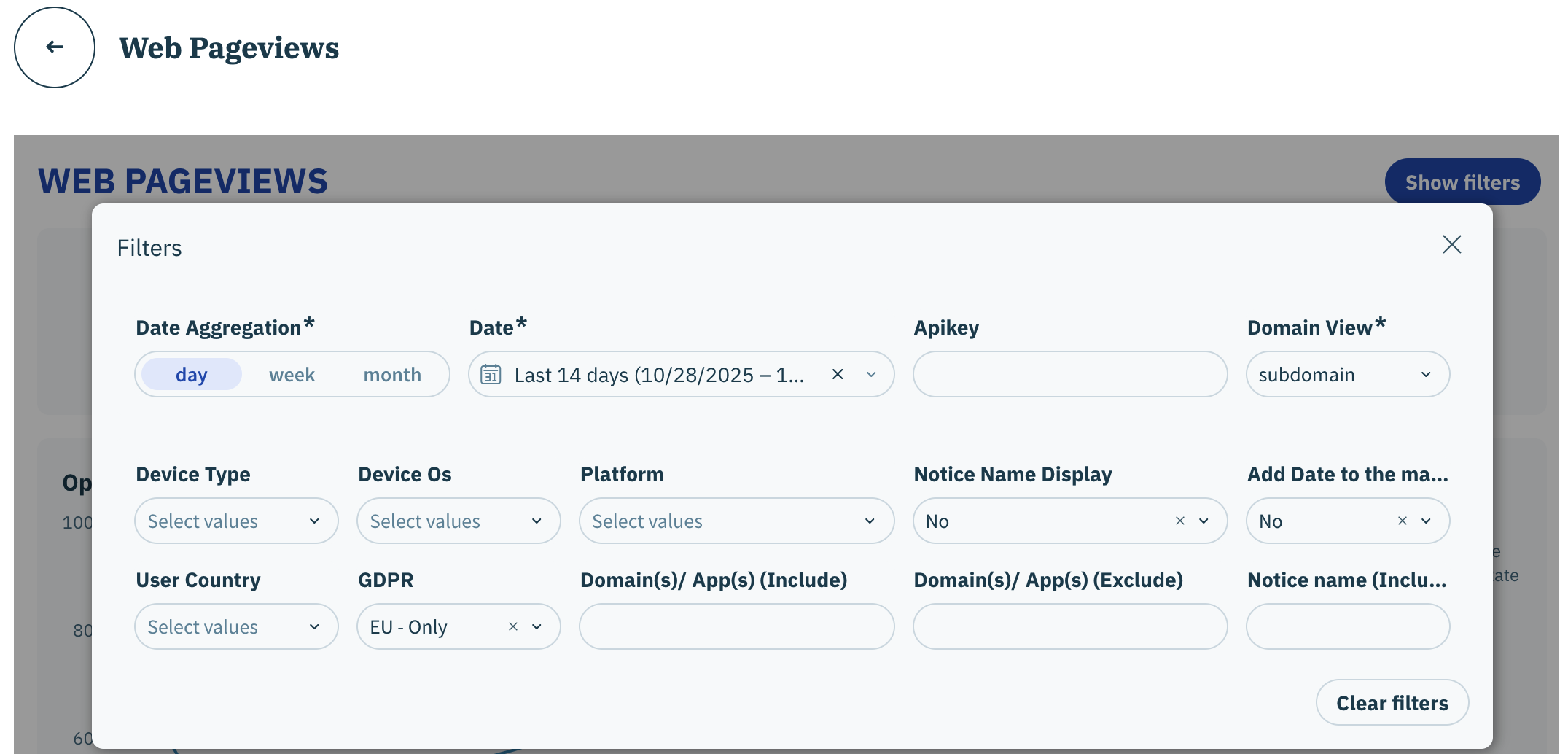
The following filters are available for the Web Pageviews dashboard:

* Date aggregation
* Date
* Apikey
* Domain view
* Device type
* Device OS
* Platform
* Notice Name Display&#x20;
* Add date to the main table
* User country
* GDPR
* Domain(s)/ App(s) (Include)
* Domain(s)/ App(s) (Exclude)
* Notice name (Include)

{% hint style="info" %}
[Click here](https://docs.didomi.io/moIvfcA7NSpjmwGZ7dzv/analytics/consent-management-platform-cmp-analytics/introduction/cmp-analytics-filters) for more information on each available filter.&#x20;
{% endhint %}

<figure><img src="https://1825037175-files.gitbook.io/~/files/v0/b/gitbook-x-prod.appspot.com/o/spaces%2FNDxbAdc00ce6bH5u1urh%2Fuploads%2FyfPcQVD2IKxW81TYq2Ci%2FScreenshot%202025-11-11%20at%2010.15.37%E2%80%AFAM.png?alt=media&#x26;token=d63d6624-a747-4e93-b100-a2954f967211" alt="" width="563"><figcaption></figcaption></figure>

### Web Pageviews dashboard data and visualizations

The following tables and visualizations are available for the Web Pageviews dashboard:

{% hint style="info" %}
Review the Didomi [CMP metric glossary](https://docs.didomi.io/moIvfcA7NSpjmwGZ7dzv/analytics/consent-management-platform-cmp-analytics/cmp-metrics/cmp-metric-glossary) for more information on metrics found in the dashboards.
{% endhint %}

<table><thead><tr><th width="235.5">Table/Visualization</th><th>Description</th></tr></thead><tbody><tr><td>Web Pageview Overview</td><td><p>View key metrics across all pageviews for the configured periodization such as:</p><ul><li>Consent Rate</li><li>Pageview Opt-in Rate</li><li>Pageview No Choice Rate</li><li>Pageview Opt-out Rate</li></ul></td></tr><tr><td>Pageview Opt-in Rate by domain</td><td>For each domain, view individual CMP traffic scope metrics such as Pageview Opt-in Rate, Pageview without consent, etc...</td></tr><tr><td>Opt-in status over time (pageviews)</td><td>Represents the trend of key CMP traffic scope metrics (pageview opt-in rate, pageview opt-out rate, pageview no choice rate) in the configured periodization.<br><br><mark style="background-color:$warning;"><strong>Note</strong>: Intervals on the line graph will be based on your selected date aggregation.</mark> </td></tr><tr><td>Opt-in Pageviews per platform</td><td>View how your organization's volume of opt-in pageviews per SDK contributes to your total opt-in pageviews (by percentage and volume) </td></tr><tr><td>Pageview Opt-in Rate over time per platform</td><td>Represents the trend of pageview opt-in rates per SDK in the configured periodization<br><br><mark style="background-color:$warning;"><strong>Note</strong>: Intervals on the line graph will be based on your selected date aggregation.</mark> </td></tr><tr><td>Opt-in Pageviews per device</td><td>View how your organization's volume of opt-in pageviews per device contributes to your total opt-in pageviews (by percentage and volume) </td></tr><tr><td>Pageview Opt-in Rate over time per device</td><td>Represents the trend of pageview opt-in rates per device in the configured periodization<br><br><mark style="background-color:$warning;"><strong>Note</strong>: Intervals on the line graph will be based on your selected date aggregation.</mark> </td></tr><tr><td>Opt-in Pageviews per OS</td><td>View how your organization's volume of opt-in pageviews per operating system contributes to your total opt-in pageviews (by percentage and volume) </td></tr><tr><td>Pageview Opt-in over time per OS</td><td>Represents the trend of pageview opt-in rates per operating system in the configured periodization<br><br><mark style="background-color:$warning;"><strong>Note</strong>: Intervals on the line graph will be based on your selected date aggregation.</mark> </td></tr><tr><td>Traffics Metrics per Country (Pageviews > 1K)</td><td>Interactive map that enables your organization to visualize the overall pageviews for each country for the configured periodization</td></tr><tr><td>Pageview Opt-in Rate by country</td><td>For each country, view CMP traffic scope metrics such as pageview opt-in rate, pageviews without consent, etc...</td></tr></tbody></table>
