# North America dashboard

{% hint style="success" %}
**Access Type**: Analytics - Viewer
{% endhint %}

The North America dashboard in Didomi CMP analytics enables your organization to view [CMP notice scope](https://docs.didomi.io/moIvfcA7NSpjmwGZ7dzv/analytics/cmp-metrics/cmp-metric-glossary#cmp-notice-scope) and [CMP traffic scope](https://docs.didomi.io/moIvfcA7NSpjmwGZ7dzv/analytics/cmp-metrics/cmp-metric-glossary#cmp-traffic-scope) metrics for consent notices in the United States and Canada (whose regulations generally assume end-users are opted-into non-sensitive data processing categories unless they explicitly opt-out). In this article, we will provide a brief overview of the data and visualizations found in the North America dashboard.

{% hint style="warning" %}
Data is available starting from **2024-10-09**, with no historical data provided prior to this date.
{% endhint %}

* [North America dashboard filters](#north-america-dashboard-filters)
* [North America dashboard data and visualizations](#north-america-dashboard-data-and-visualizations)

To start, click **Analytics** on the left-hand panel and select the **North America** card on the subsequent page.

<figure><img src="https://1825037175-files.gitbook.io/~/files/v0/b/gitbook-x-prod.appspot.com/o/spaces%2FNDxbAdc00ce6bH5u1urh%2Fuploads%2FJg4w4r6SHhA6THoPfz42%2FScreenshot%202026-02-17%20at%2010.57.56%E2%80%AFAM.png?alt=media&#x26;token=f7f93b11-52bf-473e-bdef-af8ab261b3a8" alt="" width="563"><figcaption></figcaption></figure>

***

### North America dashboard filters

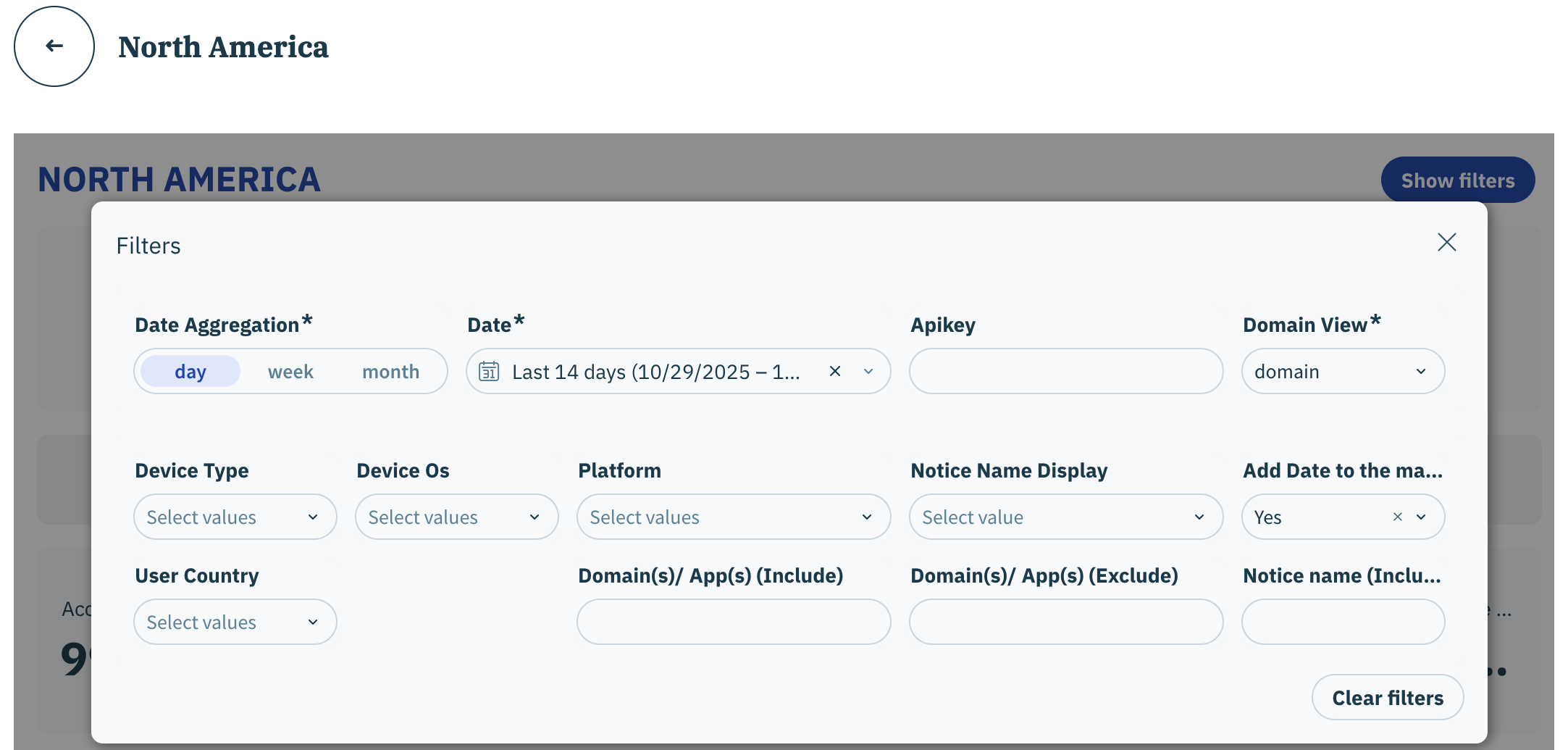
The following filters are available for the North America dashboard:

* Date aggregation&#x20;
* Date
* Apikey
* Domain view
* Device type
* Device OS
* Platform
* Notice Name Display&#x20;
* Add Date to the main table
* User country
* Domain(s)/ App(s) (Include)
* Domain(s)/ App(s) (Exclude)
* Notice name (Include)

{% hint style="info" %}
[Click here](https://docs.didomi.io/moIvfcA7NSpjmwGZ7dzv/analytics/consent-management-platform-cmp-analytics/introduction/cmp-analytics-filters) for more information on each available filter.&#x20;
{% endhint %}

<figure><img src="https://1825037175-files.gitbook.io/~/files/v0/b/gitbook-x-prod.appspot.com/o/spaces%2FNDxbAdc00ce6bH5u1urh%2Fuploads%2FTVvFf6UkEfwpUH6sWIZz%2FScreenshot%202025-11-12%20at%201.14.51%E2%80%AFPM.png?alt=media&#x26;token=f1d16b9c-f4c3-4295-b026-eda4005a72ac" alt=""><figcaption></figcaption></figure>

### North America dashboard data and visualizations

The following tables and visualizations are available for the North America dashboard:

{% hint style="info" %}
Review the Didomi [CMP metric glossary](https://docs.didomi.io/moIvfcA7NSpjmwGZ7dzv/analytics/consent-management-platform-cmp-analytics/cmp-metrics/cmp-metric-glossary) for more information on metrics found in the dashboards.
{% endhint %}

<table><thead><tr><th width="284">Table/Visualization</th><th>Description</th></tr></thead><tbody><tr><td>Count Overview</td><td><p>View key CMP notice scope metrics across consent notices for the configured periodization such as:</p><ul><li>Total Notices</li><li>Total Choices</li><li>Opt-ins</li><li>Opt-outs</li><li>No Choices</li></ul></td></tr><tr><td>Notice Rates</td><td><p>View key CMP notice scope metrics by consent notice displays for the configured periodization such as:</p><ul><li>Acceptance Rate</li><li>Opt-in Rate</li><li>Opt-out Rate</li><li>No Choice Rate</li></ul></td></tr><tr><td>Traffic Rates</td><td><p>View key CMP notice scope metrics by domain/app traffic for the configured periodization such as:</p><ul><li>Acceptance Rate</li><li>Opt-in Rate</li><li>Opt-out Rate</li><li>No Choice Rate</li></ul></td></tr><tr><td>Notice Performance</td><td>Represents the trend of  CMP notice scope metrics (opt-in rate, opt-out rate, acceptance rate) in the configured periodization<br><br><mark style="background-color:$warning;"><strong>Note</strong>: Intervals on the line graph will be based on your selected date aggregation.</mark> </td></tr><tr><td>Notice Acceptance Rate by Domain</td><td>Represents trend of acceptance rate for your organization's domains and apps in the configured periodization<br><br><mark style="background-color:$warning;"><strong>Note</strong>: Intervals on the line graph will be based on your selected date aggregation.</mark> </td></tr><tr><td>Notice Acceptance Rate by Domain (table)</td><td>View CMP consent scope and CMP traffic scope metrics broken down by domain</td></tr><tr><td>Notice Acceptance Rate by Region</td><td>Represents trend of acceptance rate for each region in the configured periodization</td></tr><tr><td>Notice Displayed Map</td><td>Interactive map that enables your organization to visualize the overall count of consent notice displays for each country for the configured periodization</td></tr><tr><td>Notice Acceptance Rate by Region</td><td>View CMP consent scope and CMP traffic scope metrics broken down by country/region</td></tr></tbody></table>
