# Configure Google Limited Ads (web)
Google Limited Ads will give publishers the ability to serve ads in a limited way in the absence of consent for the use of cookies or other local identifiers.
Since Google joined the IAB TCF v2 in August, consent on purpose 1 and legitimate interest on purposes 2,7,9,10 are required to display ads.
With [Google Limited Ads](https://support.google.com/admanager/answer/9882911?hl=en), you will be allowed to display ads when:
* consent is not given for purpose 1
* legitimate interest is available for purposes 2, 7, 9, 10
### Set up Didomi when using Limited Ads
a) First you have to select Google Advertising Products as an IAB vendor in your notice configuration:
1. Browse to your notice configuration in the console.
2. Go to "1.Regulations" - "Regulations" and click on **Edit Vendors & Purposes.**
3. Select our Google Advertising Products vendor.
4\. Save & Publish the notice.
b) Then, to avoid [doubleclik.net](http://doubleclik.net/) cookie values to be passed without getting consent, the URL used to load the gpt.js library will have to be modified on your side as such:\
(instead of ).
c) Finally, go to the "1.Regulations" - "Consent settings" step and enable both toggles here :
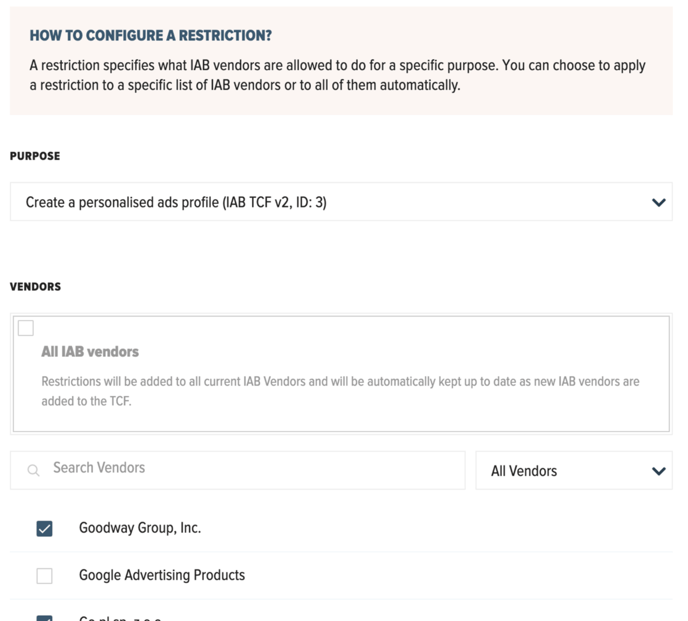
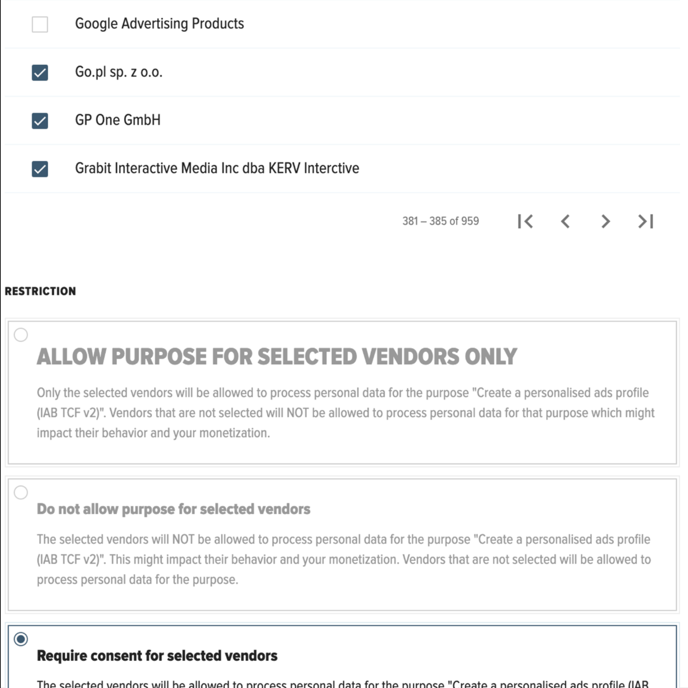
NB : if you don't want to use legitimate interest as a legal basis for other vendors than Google Advertising Products, then use publisher restrictions to "require consent" for :
* all purposes except "Store and/or access information on a device" (=you will have to do the same procedure several times, once per purpose, for all purposes except "Store and/or access information on a device" )
* and for all IAB vendors except Google (you will have to check all the boxes manually, except Google Advertising Products, as you can see on the screenshot below)
{% hint style="info" %}
We recommend you to check with your legal team if they give you permission to do all the above, ie to use legitimate interest for Google and/or all vendors, and to keep legitimate interest enabled even when users disagree.
{% endhint %}
---
# Agent Instructions: Querying This Documentation
If you need additional information that is not directly available in this page, you can query the documentation dynamically by asking a question.
Perform an HTTP GET request on the current page URL with the `ask` query parameter:
```
GET https://docs.didomi.io/integrations/google/configure-google-limited-ads-web.md?ask=
```
The question should be specific, self-contained, and written in natural language.
The response will contain a direct answer to the question and relevant excerpts and sources from the documentation.
Use this mechanism when the answer is not explicitly present in the current page, you need clarification or additional context, or you want to retrieve related documentation sections.
 4\. Save & Publish the notice.
b) Then, to avoid [doubleclik.net](http://doubleclik.net/) cookie values to be passed without getting consent, the URL used to load the gpt.js library will have to be modified on your side as such:\
4\. Save & Publish the notice.
b) Then, to avoid [doubleclik.net](http://doubleclik.net/) cookie values to be passed without getting consent, the URL used to load the gpt.js library will have to be modified on your side as such:\