# Regular expression (regex)

A regular expression (regex) is a sequence of characters that specifies a search pattern for a given string. The search pattern can include numbers, letters, space and special characters. In this article we will cover ways in which your organization can leverage regex in the Didomi console and a brief overview of some common syntax to use in your regex.

* [Didomi regex use cases](#didomi-regex-use-cases)
* [Regex common syntax](#regex-common-syntax)

### Didomi regex use cases

Regex can be used in the following areas of the Didomi console:

* [Analytics filters](#analytics-filters)
* [Compliance report URL filter](#compliance-report-url-filter)
* [Persist tracker settings by pattern](#persist-tracker-settings-by-pattern)

#### Analytics filters

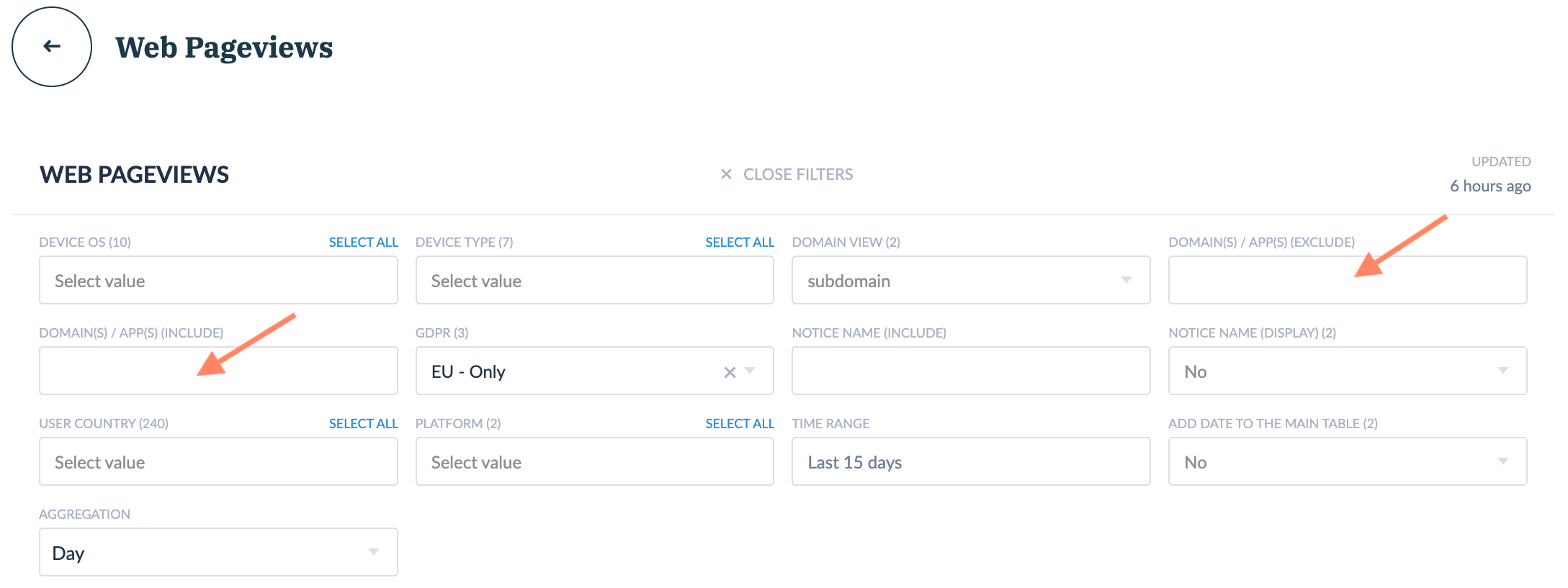
For analytics dashboards that have **Domain(s)/App(s) (Exclude)**,  **Domain(s)/App(s) (Include)**, and **Notice name** filters, your organization can use regex to filter metrics for specific domains and/or apps. The match is case insensitive.

<figure><img src="/files/zWriTgs4SDbfbW1XeiR8" alt="" width="563"><figcaption></figcaption></figure>

{% hint style="info" %}
A common regex to use with analytics filters is the pipe character "**|**" to express disjunction (matches "x" **OR** "y").&#x20;
{% endhint %}

#### Compliance report URL filter

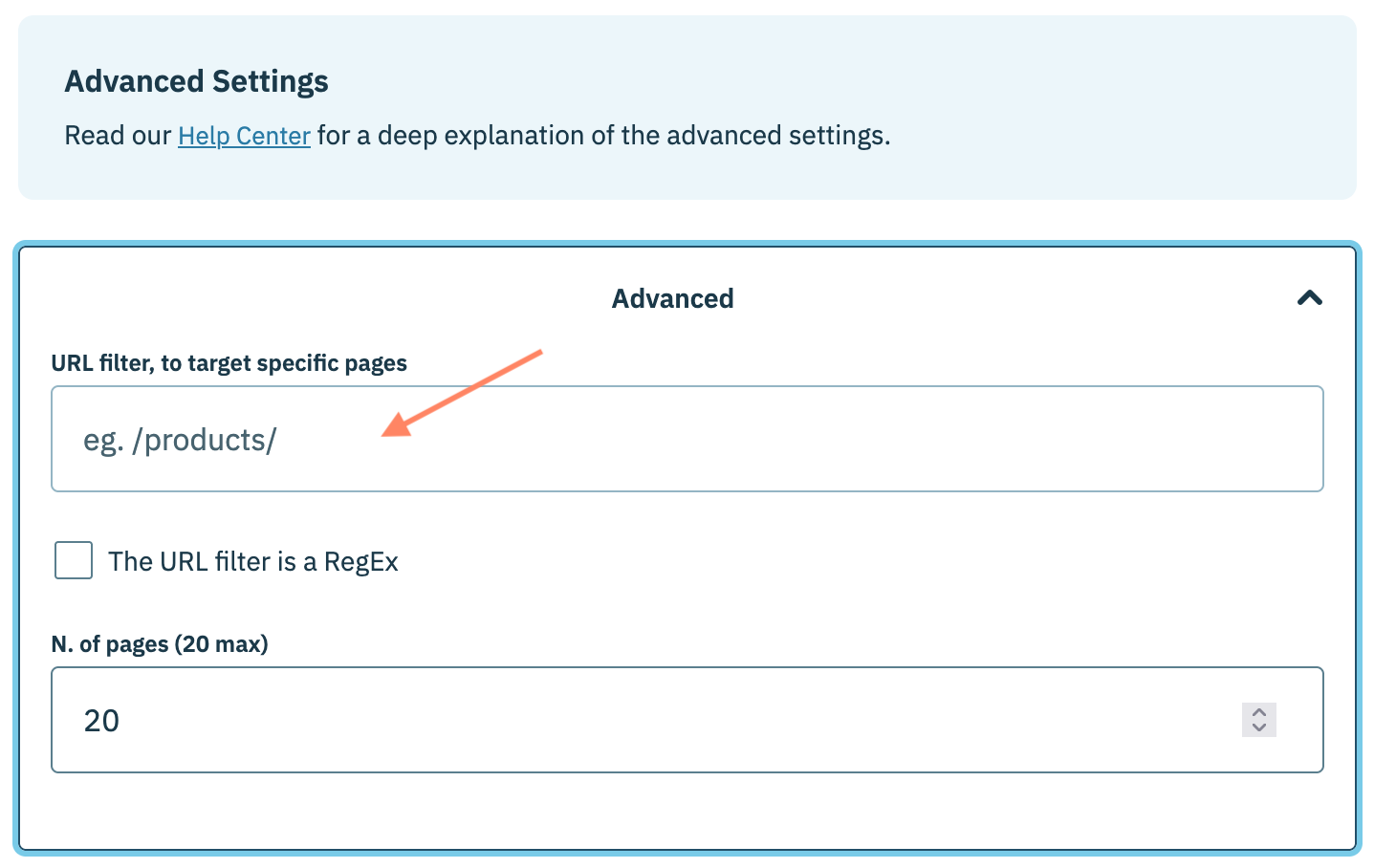
The URL filter is an advanced setting for compliance reports that enable your organization to direct the Didomi bot to only scrape URLs that contain a specific string. Enable the **The URL filter is a regular expression** toggle to use regex in the URL filter,&#x20;

<figure><img src="/files/7vSoe6Fhb9rtlPjl6QZP" alt="" width="563"><figcaption></figcaption></figure>

#### Persist tracker settings by pattern

There are specific use-cases where you may want to persist a single set of exemptions and purposes across a group of trackers that follow a particular pattern. Utilizing regular expression (regex), your organization can provide the pattern for a single tracker and Didomi will apply the tracker's settings to any tracker found in a compliance report that matches the configured pattern. [Click here](/compliance-report/tracker-policy/apply-tracker-settings-by-regex.md) to learn more about persisting tracker settings by a regex pattern.

<figure><img src="/files/GxvZsJVEHtSqwApuiMeI" alt="" width="563"><figcaption></figcaption></figure>

### Regex common syntax

The table below offers some common regex syntax that your organization can utilize in your expressions. Didomi strongly encourages you to test your regex before applying them to your filters with free regex tools such as [regexr.com](https://regexr.com/).

<table><thead><tr><th width="92.35003662109375">Syntax</th><th width="175.60003662109375">Description</th><th width="123.2999267578125">Example</th><th>Matched</th><th>Not Matched</th></tr></thead><tbody><tr><td><code>.</code></td><td>Placeholder the matches any character (including spaces)</td><td>a.c</td><td>abc<br>baec</td><td>abdc (two characters instead of one between a and c</td></tr><tr><td><code>.*</code></td><td>matches all characters</td><td>test.*</td><td>testtest<br>test-version6<br>domain-text</td><td>domain-tes (missing character)</td></tr><tr><td><code>^</code></td><td>matches at the beginning of the string</td><td>^debug</td><td>debug.domain.com</td><td>domain.debug (does not start with debug)</td></tr><tr><td><code>$</code></td><td>matches at the end of the string</td><td>.com$</td><td>domain.com<br>support.domain.com</td><td>domain.com.co (does not end with .com)</td></tr><tr><td><code>\/</code></td><td>escapes <code>/</code>  character</td><td>\/page2\/</td><td>/page2/</td><td>/page-v2/</td></tr><tr><td><code>[abc]</code></td><td>any of a, b, c</td><td>test-[yv]</td><td>test-y<br>test-v</td><td>test-[yv] (identified as regex pattern and not characters)</td></tr><tr><td><code>ab|cd</code></td><td>matches ab or cd</td><td>domain|support</td><td>dev.domain.com<br>subdomain.com<br>support.fr</td><td>mainpg (neither word is in string)</td></tr><tr><td><code>^(ab|cd)</code></td><td>matches beginning with ab or cd</td><td>^(debug|support)</td><td>debug.domain.com<br>support.domain.com</td><td>domain.debug.com (debug is not at the start of string)</td></tr><tr><td><code>(ab|cd)$</code></td><td>matches end with ab or cd</td><td>(.fr|.co.uk)$</td><td>domain.fr<br>sub.domain.fr<br>domain.co.uk</td><td>.fr.domain.com (string does end in .fr)</td></tr></tbody></table>


---

# Agent Instructions: Querying This Documentation

If you need additional information that is not directly available in this page, you can query the documentation dynamically by asking a question.

Perform an HTTP GET request on the current page URL with the `ask` query parameter:

```
GET https://docs.didomi.io/get-started/general/regular-expression-regex.md?ask=<question>
```

The question should be specific, self-contained, and written in natural language.
The response will contain a direct answer to the question and relevant excerpts and sources from the documentation.

Use this mechanism when the answer is not explicitly present in the current page, you need clarification or additional context, or you want to retrieve related documentation sections.
