> For the complete documentation index, see [llms.txt](https://docs.didomi.io/llms.txt). Markdown versions of documentation pages are available by appending `.md` to page URLs; this page is available as [Markdown](https://docs.didomi.io/get-started/general/migrate-to-didomi-consent-string-dcs.md).
# Migrate to Didomi Consent String (DCS)
{% hint style="warning" %}
**Note**: Consent notices created after **June 17th, 2025** will have the Didomi Consent String (DCS) enabled by default (*i.e.* `didomi_dcs` *will be utilized to store end-user consent*). Previously created message can migrate to the Didomi Consent String (DCS). [Click here](/get-started/general/migrate-to-didomi-consent-string-dcs.md) to learn more about migrating to the DCS.
{% endhint %}
The [Didomi Consent String (DCS) ](/get-started/general/didomi-consent-string-dcs-and-signature.md)is a compact and modern consent string format that is designed to offer full flexibility in representing an end-user's privacy choices. It is fully supported on both web and mobile platforms includes all of Didomi SDKs for websites, iOS, and Android applications.
The Didomi Consent String (DCS) is stored in `didomi_dcs` and is an alternative to `didomi_token` which was typically stored in a browser's cookies or local storage. In this article, we will cover how to manually upgrade a consent notice so that it leverages the Didomi Consent String (DCS)
{% hint style="info" %}
Please contact the Didomi support team if your organization wishes to bulk migrate all of your consent notices to the Didomi Consent String (DCS).
{% endhint %}
From your Didomi console, click **Consent Notices** on the left-hand panel and select a consent notice from the list.
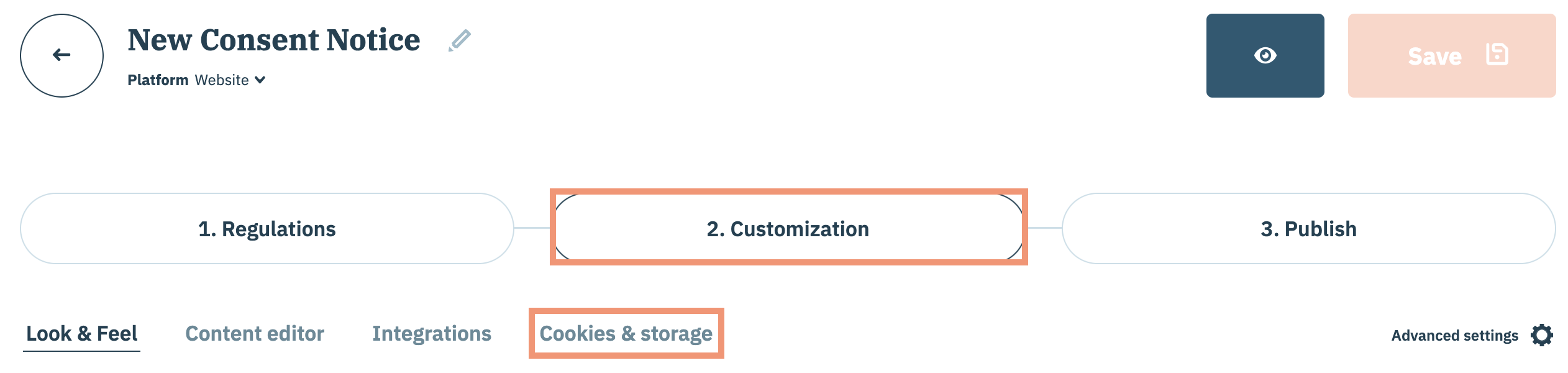
Select **Customization** and then click **Cookies & storage** on the subsequent page.
Navigate to **Didomi Consent String** panel and enable the checkbox.
{% hint style="warning" %}
**Before** publishing a migrated consent notice, please ensure that your organization have satisfied the following:
* If your organization's website or app accessed `didomi_token` in JSON format that it is updated to handle the binary format of `didomi_dcs` . [Click here](https://developers.didomi.io/cmp/didomi-consent-string) for more information.
* If your organization is integrated with third-party vendors that expect the `didomi_token` you may need to coordinate format updates with these partners
{% endhint %}
Continue publishing your migrated consent notice when finished.
---
# Agent Instructions
This documentation is published with GitBook. GitBook is the documentation platform designed so that both humans and AI agents can read, navigate, and reason over technical content effectively. Learn more at gitbook.com.
## Querying This Documentation
If you need additional information that is not directly available in this page, you can query the documentation by asking a question.
Perform an HTTP GET request on the following URL with the `ask` and `goal` query parameters:
```
GET https://docs.didomi.io/get-started/general/migrate-to-didomi-consent-string-dcs.md?ask=&goal=
```
`ask` is the immediate question: it should be specific, self-contained, and written in natural language.
`goal` is what the user is ultimately trying to achieve, the reason they need the answer. Sharing it helps GitBook give you a better, more relevant answer. A goal is most helpful when it describes the outcome the user wants rather than restating the question. For example, with `ask=how do I create an API token`, a goal like `automate deployments from our CI pipeline` lets GitBook tailor the answer to that use case.
The response will contain a direct answer to the question and relevant excerpts and sources from the documentation.
Use this mechanism when the answer is not explicitly present in the current page, you need clarification or additional context, or you want to retrieve related documentation sections.