# Didomi Consent String (DCS) & Signature

{% hint style="info" %}
The Didomi Consent String (DCS) `didomi_dcs` is an alternative to the `didomi_token`  as the mechanism used to store end-user consent. [Click here](/get-started/general/migrate-to-didomi-consent-string-dcs.md) for more information on migrating your consent notices so that use the Didomi Consent String.
{% endhint %}

The Didomi Consent String (DCS) is a compact and modern consent string format that is designed to offer full flexibility in representing an end-user's privacy choices. It is fully supported on both web and mobile platforms includes all of Didomi SDKs for websites, iOS, and Android applications. In this article, we will cover the following:

* [Didomi Consent String (DCS) overview](#didomi-consent-string-dcs-overview)
* [`didomi_dcs`](#didomi_dcs-cookie)
* [Didomi Consent String (DCS) encoding ](#didomi-consent-string-dcs-encoding)
* [Didomi Signature](#didomi-signature)
* [Decode Didomi Consent String (DCS)](#decode-didomi-consent-string-dcs-1)

***

### &#x20;Didomi Consent String (DCS) overview

The Didomi Consent String (DCS) is a foundational component of privacy infrastructure that is highly performant and enables legal compliance. It exceeds the scope of traditional solutions by enabling organizations to encode and store all types of consent data in a single binary string.

Inspired by the Interactive Advertising Bureau's (IAB) TC String, an industry standard for Transparency and Consent Framework (TCF) vendors, the DCS allows your organization to not only support TCF vendors and purposes but also custom vendors and purposes, Authorized Technology Providers (ATPs), etc. in a single, lightweight, and privacy-compliant format. Some benefits of utilizing the DCS include:

<table data-header-hidden><thead><tr><th width="174">Benefit</th><th>Description</th></tr></thead><tbody><tr><td>Compact size</td><td>Uses a binary format instead of JSON, reducing the overall cookie size to stay well below 2 KB.</td></tr><tr><td>Performance boost</td><td>Lighter payloads improve page speed and SEO rankings.</td></tr><tr><td>Easier to parse</td><td>No need to decode complex JSON strings client-side.</td></tr></tbody></table>

{% hint style="info" %}
[Click here](https://developers.didomi.io/cmp/didomi-consent-string) to review Didomi developer documentation regarding the Didomi Consent String (DCS).
{% endhint %}

### `didomi_dcs`&#x20;

The Didomi Consent String (DCS) is stored in `didomi_dcs` and is an alternative to  `didomi_token` which was typically stored in a browser's cookies or local storage. Like its predecessor  `didomi_dcs` can be:

* Stored in cookies or local storage.
* Read by Didomi SDKs, APIs, and third-party integrations.

  Read by Didomi SDKs, APIs, and third-party integrations.
* Used to determine whether consent or legitimate interest applies to specific data processing activities.

{% hint style="warning" %}
**Note:** Consent notices created after **June 17th, 2025** will have the Didomi Consent String (DCS) enabled by default (*i.e.* `didomi_dcs` *will be utilized to store end-user consent*). Previously created message can migrate to the Didomi Consent String (DCS). [Click here](/get-started/general/migrate-to-didomi-consent-string-dcs.md) to learn more about migrating to the DCS.
{% endhint %}

### Didomi Consent String (DCS) encoding&#x20;

The Didomi Consent String (DCS) utilizes a binary format that is designed to be efficient and flexible. It supports three encoding mechanisms:

<table data-header-hidden><thead><tr><th width="197.5">Mechanism</th><th>Description</th></tr></thead><tbody><tr><td>BitField</td><td>Ideal for compactly encoding consecutive or closely packed IDs</td></tr><tr><td>Range</td><td>Efficient when encoding groups of IDs with gaps</td></tr><tr><td>Fibonacci</td><td>Optimized for compressing large sets of continuous or patterned ID ranges</td></tr></tbody></table>

Each section within the DCS (e.g., purposes or vendors) may use a different encoding mechanism, depending on the nature and distribution of the IDs. The encoding is automatically selected by the Didomi DCS library to generate the smallest and most efficient string possible.

Data within the DCS include the following:

<table data-header-hidden><thead><tr><th width="236">Data</th><th>Description</th></tr></thead><tbody><tr><td>Header metadata</td><td>Version, creation date, last update date, user ID, and sync status.</td></tr><tr><td>Purposes consent</td><td>End-user choices for processing their personal data for specific purposes that utilize consent as a legal basis.</td></tr><tr><td>Purposes legitimate interest</td><td>End-user choices for processing their data for specific purposes that utilize legitimate interest as a legal basis.</td></tr><tr><td>Vendors consent</td><td>End-user choices for allowing specific vendors to process data that utilize consent as a legal basis.</td></tr><tr><td>Vendors legitimate interest</td><td>End-user choices for allowing specific vendors to process data that utilize legitimate interest as a legal basis.</td></tr><tr><td>Device ID (DID)</td><td>Unique device identifier. (Optional) </td></tr><tr><td>Organization User ID (OUID)</td><td>User ID provided by the organization that is useful for syncing consent across devices. (Optional) </td></tr><tr><td>Signature</td><td>A premium feature that adds a cryptographic signature to verify the integrity and authenticity of the consent string. (Optional) <br><br><a href="#didomi-signature">Click here</a> for more information.</td></tr></tbody></table>

### Didomi Signature

The Didomi Signature is a premium feature for the Didomi Consent String (DCS) and adds a cryptographic seal to the DCS to ensure the authenticity and integrity of the end-user's consent. The signature can help your organization to:

* Verify end-user consent data has not been tampered with
* Add legal value by proving an end-user's consent is genuine and unchanged

{% hint style="info" %}
[Click here](broken://pages/hYxfS6NEXavSUQlm3wwK) for information on how to enable the Didomi Signature.
{% endhint %}

<img src="/files/Lb9oQa1gqjH8I1PMKbei" alt="" width="563">

The signature is a combination of a **key** and the **signature**. Didomi utilizes multiple signing keys (A, B, C...) with a round-robin algorithm and if a key is ever compromised it is disabled and rotated out with no service disruption

```
// Signature example

CMEYCIQCxaQZGTjKUdeh1BfsWE1fbHoskKbOu8lqcbhQAe7pRlQIhAI80Rm3Qk6VGWNUMLD8D/VcndQ1ufw26hQsfWNgH7KjY
```

### Decode Didomi Consent String (DCS)

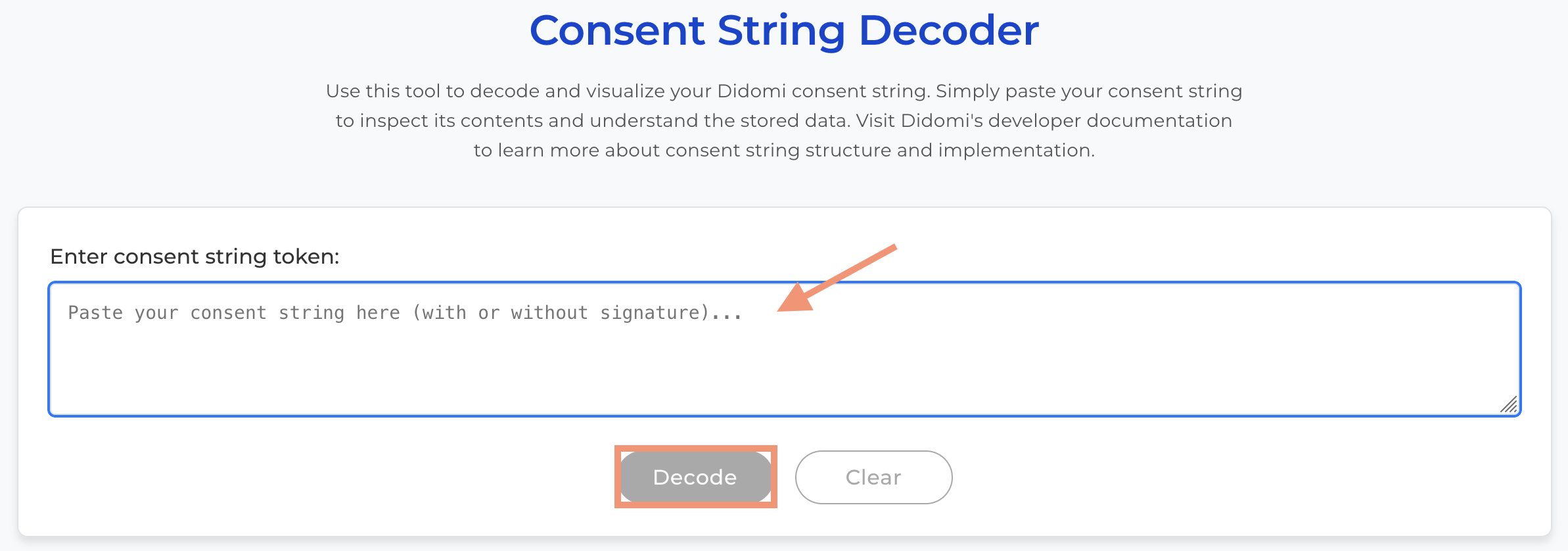
The Didomi Consent String (DCS) can be decode by using the [DCS decoder](https://dcs-decoder.didomi.io/), which will transform the binary string into a human-readable JSON object.

{% hint style="info" %}
[Click here](https://developers.didomi.io/cmp/didomi-consent-string/decoding-tools) to review our developer documentation on how to programatically decode the Didomi Consent String (DCS).
{% endhint %}

Input the end-user's DCS into the provided space and click **Decode**.

<figure><img src="/files/G9vsPVUYzsuWQbK6AM2r" alt="" width="563"><figcaption></figcaption></figure>

The DCS decoder output will include the following:

* Full JSON object containing consent metadata, vendor/purpose selections, and timestamps.
* Signature verification status (if the DCS contains a cryptographic signature)

```json
//Example
{
  "user_id": "19938c3e-f28b-603a-bc1b-520c55f12345",
  "created": "2025-09-11T12:33:08.900Z",
  "updated": "2025-09-11T12:33:13.300Z",
  "regulation_id": 1,
  "purposes_optin": {
    "enabled": [
      16653
    ],
    "disabled": []
  },
  "purposes_optout": {
    "enabled": [],
    "disabled": []
  },
  "vendors_optin": {
    "enabled": [
      1,
      2,
      14032
    ],
    "disabled": []
  },
  "vendors_optout": {
    "enabled": [
      2,
      14032
    ],
    "disabled": []
  }
}
```


---

# Agent Instructions: Querying This Documentation

If you need additional information that is not directly available in this page, you can query the documentation dynamically by asking a question.

Perform an HTTP GET request on the current page URL with the `ask` query parameter:

```
GET https://docs.didomi.io/get-started/general/didomi-consent-string-dcs-and-signature.md?ask=<question>
```

The question should be specific, self-contained, and written in natural language.
The response will contain a direct answer to the question and relevant excerpts and sources from the documentation.

Use this mechanism when the answer is not explicitly present in the current page, you need clarification or additional context, or you want to retrieve related documentation sections.
