# Réorganiser les boutons de la bannière de consentement (web)
Par défaut, le bouton « Learn more » sera affiché *avant* le bouton « Agree » sur la bannière fixe. Si vous utilisez le format de bannière pop-in, « Learn more » sera affiché *après* « Agree ».
#### ✅ Étapes pour modifier l’ordre des boutons sur un avis web :
* Allez à **Avis de consentement**.
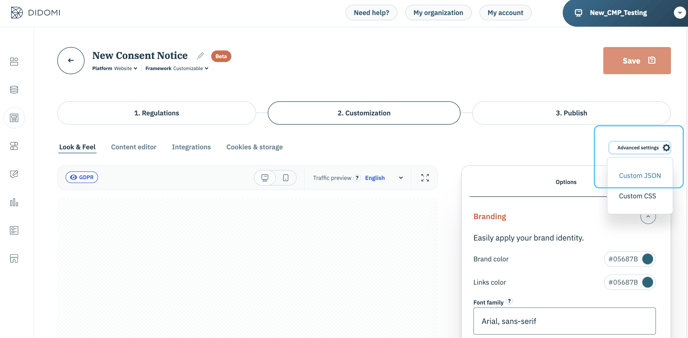
* Allez à l’étape **2. Personnalisation**.
* Cliquez sur **Advanced settings** puis **JSON personnalisé**.
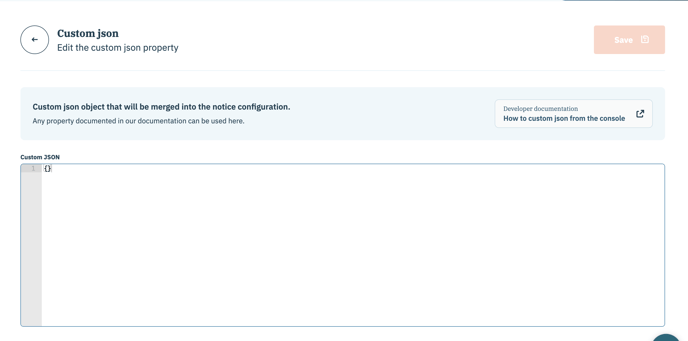
* Ajoutez le code (voir ci-dessous) dans le champ JSON personnalisé.
#### ✍️ Code à insérer
Pour modifier l’ordre, vous devez définir la valeur à :
* "before" pour le format pop-in
* "after" pour le format de bannière fixe
**Format pop-in :**
```
{
"notice": {
"learnMorePosition": "before"
}
}
```
**Format de bannière fixe :**
```
{
"notice": {
"learnMorePosition": "after"
}
}
```
📰 Veuillez vous référer à notre [guide du développeur](https://developers.didomi.io/cmp/web-sdk/consent-notice/notice/look-and-feel) pour plus d’informations.
---
# Agent Instructions: Querying This Documentation
If you need additional information that is not directly available in this page, you can query the documentation dynamically by asking a question.
Perform an HTTP GET request on the current page URL with the `ask` query parameter:
```
GET https://docs.didomi.io/fr/plateforme-de-gestion-du-consentement-cmp/bannieres-de-consentement/reorganiser-les-boutons-de-la-banniere-de-consentement-web.md?ask=
```
The question should be specific, self-contained, and written in natural language.
The response will contain a direct answer to the question and relevant excerpts and sources from the documentation.
Use this mechanism when the answer is not explicitly present in the current page, you need clarification or additional context, or you want to retrieve related documentation sections.