> For the complete documentation index, see [llms.txt](https://docs.didomi.io/llms.txt). Markdown versions of documentation pages are available by appending `.md` to page URLs; this page is available as [Markdown](https://docs.didomi.io/consent-management-platform-cmp/sdk-version-control.md).
# SDK version control
Didomi offers your organization flexible release management to control how updates are delivered to your environment(s) for your CMP consent notices. In this article, we will provided a brief overview of the different versioning options and how the Didomi SDK version control feature applies per SDK type.
* [Versioning options overview ](#versioning-options-overview)
* [Versioning options per SDK](#versioning-optioner-per-sdk-type)
* [Release notes and notifications](#release-notes-and-notifications)
{% hint style="info" %}
For all Didomi SDKs, we utilize semantic versioning to reflect the type of change between versions. The semantic versioning is a 3-component number format to indicate **Major.Minor.Patch**. In this schema, Didomi will update the major number for any breaking update, minor number for new features, and patch number for fixes.
{% endhint %}
***
### Versioning options overview
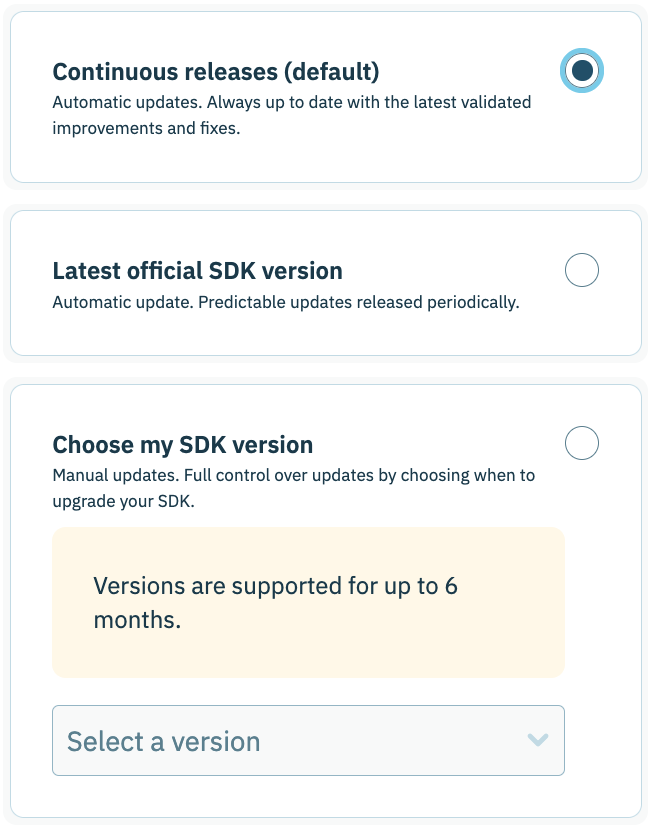
Didomi supports three different versioning options: continuous releases, latest official version, and pinned version. Regardless of which versioning option your organization selects, every release is tested and undergoes quality control before deployment to the Didomi production environment.
* [Continuous releases](#continuous-releases)
* [Latest official version](#continuous-releases)
* [Pinned version (Choose SDK version)](#pinned-version-choose-sdk-version)
{% tabs %}
{% tab title="Continuous releases" %}
When continuous releases is selected as the version control option for Didomi SDKs, every new update that Didomi deploys into production will be automatically applied to the consent notice.
This version control option enables your organization to receive the latest improvements and bug fixes with no additional effort or compromise on stability.
Didomi recommends the continuous releases version control option for organizations who want the fastest updates, first access to new frameworks and compliance support, and who do not need to validate changes in advance.
{% hint style="info" %}
Continuous releases is the default version control option for the Didomi [web SDK](/consent-management-platform-cmp/sdk-version-control/configure-web-sdk-version-control.md) and [web-based CTV](/consent-management-platform-cmp/sdk-version-control/configure-web-based-ctv-sdk-version-control.md) SDK.
{% endhint %}
{% endtab %}
{% tab title="Latest official version" %}
When latest official version is selected as the version control option for Didomi SDKs, Didomi will package all releases within a **2 week** time span into an official version that will then be automatically applied to your consent notice.
This version control option provides your organization with a measure of predictability with curated release notes detailing the updates grouped into the official version
Didomi recommends the latest official version control option for organizations who prefer more predictability and may require time to validate updates before they go live for consent notices.
{% hint style="danger" %}
**Hotfixes**
Didomi defines a hotfix as any urgent update required to address a security or compliance issue, or a critical bug affecting client revenue. If a critical bug is discovered (*e.g. preventing SDK initialization*), Didomi will deploy a hotfix immediately and force a **new** official version irrespective of the 3 week time span.
The new official version will include the hotfix and any updates that have been released since the last official version.
{% endhint %}
{% endtab %}
{% tab title="Pinned version (Choose SDK version)" %}
When pinned version is selected as the version control option for Didomi SDKs, your organization will select from the consent notice configuration flow which version of the SDK should be loaded (using Didomi's semantic versioning).
The version of the Didomi SDK is locked for the consent notice and will be used in the consent notice preview and where the consent notice is deployed on your websites/applications until your organization chooses to upgrade the SDK version.
{% hint style="warning" %}
**Note**: Didomi only allows your organization to utilize a pinned version of the SDK that is no older than 6 months. If your pinned version of the Didomi SDK exceeds 6 months, we will notify you within the Didomi console and via email, and automatically upgrade you to the latest SDK version if no action is taken.
{% endhint %}
Didomi recommends the pinned version control option for organizations who require complete control over updates, need to manage freeze periods, or have involved QA processes.
{% hint style="danger" %}
When using pinned version as the version control option for the Didomi SDK, your organization will not benefit from any [hotfixes](#latest-official-version) that Didomi releases until the SDK version is upgraded to the latest SDK.
{% endhint %}
{% endtab %}
{% endtabs %}
### Versioning options per SDK
The availability for versioning options is dependent on both the type of SDK your organization is loading for the consent notice and, for some SDKs, your subscription tier. Please refer to the table for an overview of the available versioning options per SDK type:
| SDK type | Continuous releases | Latest official version | Pinned version (Choose SDK version) |
| ------------------------- | ------------------- | ----------------------- | ----------------------------------- |
| Web SDK | Default | Premium option | Premium option |
| Web-based CTV SDK | Default | Included | Included |
| Mobile SDKs (iOS/Android) | N/A | Included | N/A |
| Native CTV SDKs | N/A | Included | N/A |
| App v2 SDK | N/A | Included | N/A |
### Release notes and notifications
For every official version that Didomi releases, we will include a release note with the grouping of updates so that your organization can get an overview of the changes. These release notes can help inform your organization's QA process and, for organization's who utilize the pinned version control option, help inform decisions on upgrading to a particular SDK version.
Release notes for Didomi SDKs can be found in our [developer portal](https://developers.didomi.io/).
{% hint style="warning" %}
**Note**: There are no detailed release notes provided by Didomi for individual releases deployed through our continuous release process. These updates will be retroactively documented in the release note for the official version.
New features will be announced via the Didomi newsletter and social media channels.
{% endhint %}
---
# Agent Instructions
This documentation is published with GitBook. GitBook is the documentation platform designed so that both humans and AI agents can read, navigate, and reason over technical content effectively. Learn more at gitbook.com.
## Querying This Documentation
If you need additional information that is not directly available in this page, you can query the documentation dynamically by asking a question.
Perform an HTTP GET request on the current page URL with the `ask` query parameter, and the optional `goal` query parameter:
```
GET https://docs.didomi.io/consent-management-platform-cmp/sdk-version-control.md?ask=&goal=
```
`ask` is the immediate question: it should be specific, self-contained, and written in natural language.
`goal` is optional and describes the broader end goal you are ultimately trying to accomplish on behalf of the user. GitBook uses it to tailor the answer towards what is most useful for that goal.
The response will contain a direct answer to the question and relevant excerpts and sources from the documentation.
Use this mechanism when the answer is not explicitly present in the current page, you need clarification or additional context, or you want to retrieve related documentation sections.