> For the complete documentation index, see [llms.txt](https://docs.didomi.io/llms.txt). Markdown versions of documentation pages are available by appending `.md` to page URLs; this page is available as [Markdown](https://docs.didomi.io/consent-management-platform-cmp/frameworks-regulations/iab-tcf/deactivate-iab-tcf-integration-for-consent-notice.md).
# Deactivate IAB TCF integration for consent notice
The IAB Transparency and Consent Framework (TCF) is a solution built by IAB members to establish standards in the advertising industry. The main goal of the TCF is to help all parties in the digital advertising chain ensure that they comply with the EU’s GDPR and ePrivacy Directive when processing personal data or accessing and/or storing information on a user’s device, such as cookies, advertising identifiers, device identifiers, and other tracking technologies. It indicates to the users which data are collected and how the website and its partners will use them. It also gives everyone a common language to simplify communication with users.
🔎 Our TCF integration enables you to share user consent status to all the IAB vendors you have selected in the console automatically. If you need to disable this function, here is a guide to help you.
{% hint style="info" %}
If you have created your Consent Notice by selecting "IAB TCF Framework" but then change your mind, don't worry; you can change it during the Consent Notice configuration process!
{% endhint %}

#### **Option 1) Disable the integration at the "Integrations" section, but you want to use the default text:**
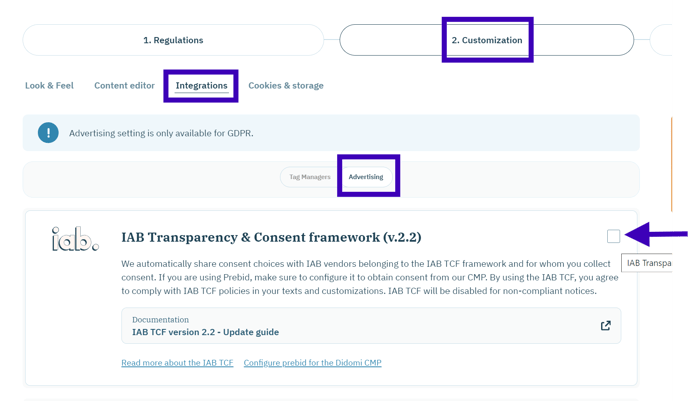
1. Go to 2. Customization; Integrations - Advertising tab.
2. Uncheck the box of the **IAB Transparency & Consent framework** integration.
🎉 The TCF integration has been disabled on your notice, you are now able to modify your notice text.
{% hint style="info" %}
If you want to continue using our standard text, it is not necessary to follow the next step "Choose a custom text".
{% endhint %}
#### Option 2) If you want to have your own text without the IAB integration (optional):
{% hint style="info" %}
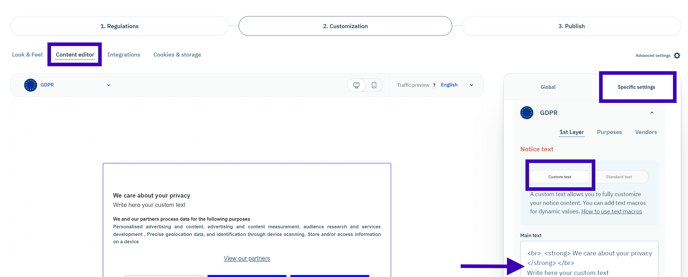
In this case, you don't need to complete the first step as the integration will be automatically disabled; you can directly choose "custom text" in the "Content editor" section.
{% endhint %}
1. Go to **2. Customization; Integrations; Content editor tab**
2. Go to the **Specific settings** section of your consent notice.
3. Choose the option **Custom text**. \
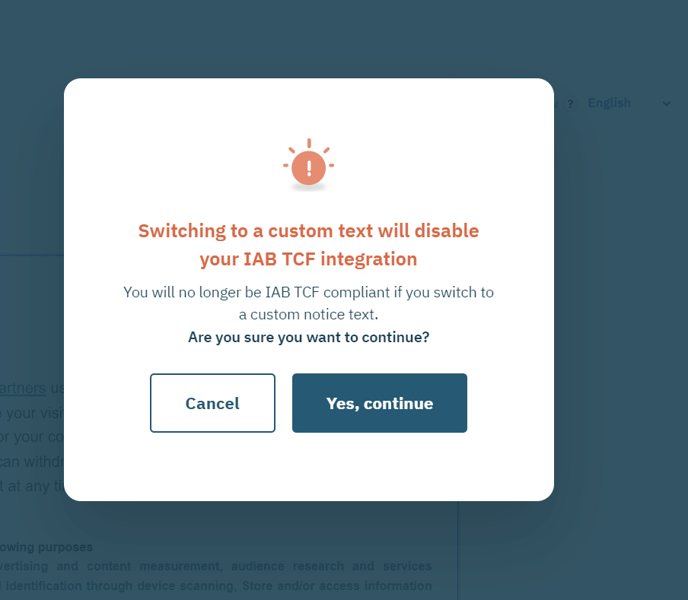
A message will be displayed on your screen to inform you that the IAB TCF integration is going to be disabled.
4. Click on the red button, **Yes, continue** in order to disable the TCF Integration.
🎉 The TCF integration has been disabled on your notice, you are now able to modify your notice text.
{% hint style="warning" %}
**If you are working with IAB vendors and want to disable the TCF, please check with them if they are willing to work outside the TCF. Read more** [**here**](https://support.didomi.io/not-using-the-iab-tcf-framework-but-working-with-iab-vendors-new-flow)
{% endhint %}
---
# Agent Instructions
This documentation is published with GitBook. GitBook is the documentation platform designed so that both humans and AI agents can read, navigate, and reason over technical content effectively. Learn more at gitbook.com.
## Querying This Documentation
If you need additional information that is not directly available in this page, you can query the documentation by asking a question.
Perform an HTTP GET request on the following URL with the `ask` and `goal` query parameters:
```
GET https://docs.didomi.io/consent-management-platform-cmp/frameworks-regulations/iab-tcf/deactivate-iab-tcf-integration-for-consent-notice.md?ask=&goal=
```
`ask` is the immediate question: it should be specific, self-contained, and written in natural language.
`goal` is what the user is ultimately trying to achieve, the reason they need the answer. Sharing it helps GitBook give you a better, more relevant answer. A goal is most helpful when it describes the outcome the user wants rather than restating the question. For example, with `ask=how do I create an API token`, a goal like `automate deployments from our CI pipeline` lets GitBook tailor the answer to that use case.
The response will contain a direct answer to the question and relevant excerpts and sources from the documentation.
Use this mechanism when the answer is not explicitly present in the current page, you need clarification or additional context, or you want to retrieve related documentation sections.