> For the complete documentation index, see [llms.txt](https://docs.didomi.io/llms.txt). Markdown versions of documentation pages are available by appending `.md` to page URLs; this page is available as [Markdown](https://docs.didomi.io/consent-management-platform-cmp/frameworks-regulations/iab-tcf/configure-legitimate-interest-behavior-when-end-user-disagrees.md).
# Configure legitimate interest behavior when end-user disagrees
Our console allows you to choose how legitimate interest is affected when a user disagrees.
This means that you can either deactivate or keep activated a purpose based on legitimate interest when a user disagrees from the first view of the notice and on the 2nd view (purposes' layer)
To achieve this, please follow this procedure:
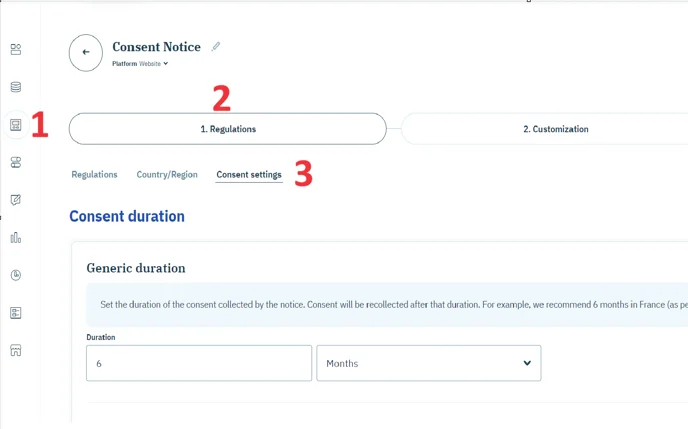
* Go to your consent notice in the Didomi console. (1)
* Click on the fourth step 1. Regulations. (2)
* Go to the Consent settings tab. (3)
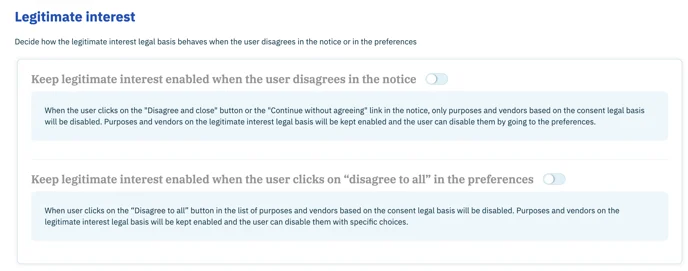
Scroll down to the Legitimate interest section.
Select one option, both or none, depending on how you want the legitimate interest legal basis to behave.
The 1st option concerns a refusal on the 1st layer of the banner, the 2nd option concerns a refusal on the 2nd layer.
👉Didomi recommends deactivating legitimate interest from the moment a user disagrees. We encourage you to discuss this topic with your legal department.
{% hint style="info" %}
To deactivate legitimate interest from the moment a user disagrees, none of the two options should be selected.
{% endhint %}
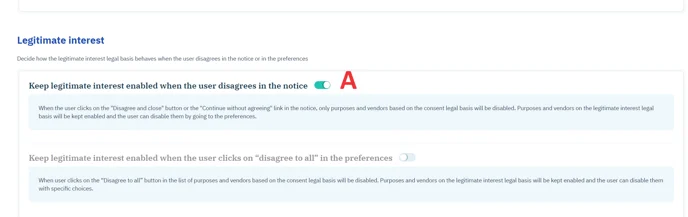
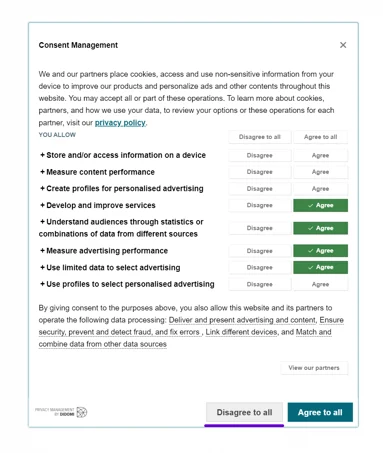
Focus on option A) If a user disagrees on the first view of the notice, only purposes based on consent will be refused, and all vendors and purposes based on legitimate interest will be kept enabled.
To disable legitimate interest, the user will have to do it in the preference view.
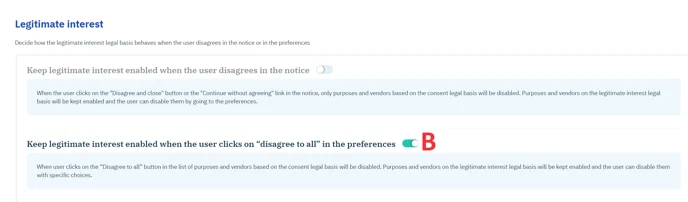
Focus on option B) If the user disagrees to all on the second view of the notice (preference view), only purposes based on consent will be refused, and all vendors and purposes based on legitimate interest will be kept enabled.
To disable legitimate interest, the user will have to make specific choices for the vendors and purposes.
This option refers to the button "Disagree to all" at the bottom of your banner:
⚠️ Please note: This option is only applicable the first time the banner is opened and not when the user changes his preferences. The button will not be displayed if a choice has already been made or if the user has started making a granular selection.
---
# Agent Instructions
This documentation is published with GitBook. GitBook is the documentation platform designed so that both humans and AI agents can read, navigate, and reason over technical content effectively. Learn more at gitbook.com.
## Querying This Documentation
If you need additional information that is not directly available in this page, you can query the documentation by asking a question.
Perform an HTTP GET request on the following URL with the `ask` and `goal` query parameters:
```
GET https://docs.didomi.io/consent-management-platform-cmp/frameworks-regulations/iab-tcf/configure-legitimate-interest-behavior-when-end-user-disagrees.md?ask=&goal=
```
`ask` is the immediate question: it should be specific, self-contained, and written in natural language.
`goal` is what the user is ultimately trying to achieve, the reason they need the answer. Sharing it helps GitBook give you a better, more relevant answer. A goal is most helpful when it describes the outcome the user wants rather than restating the question. For example, with `ask=how do I create an API token`, a goal like `automate deployments from our CI pipeline` lets GitBook tailor the answer to that use case.
The response will contain a direct answer to the question and relevant excerpts and sources from the documentation.
Use this mechanism when the answer is not explicitly present in the current page, you need clarification or additional context, or you want to retrieve related documentation sections.