> For the complete documentation index, see [llms.txt](https://docs.didomi.io/llms.txt). Markdown versions of documentation pages are available by appending `.md` to page URLs; this page is available as [Markdown](https://docs.didomi.io/consent-management-platform-cmp/frameworks-regulations/iab-global-privacy-protocol-gpp/us-privacy-v2.md).
# US privacy V2
#### What’s new in US Privacy v2?
**1- Expanded coverage**
Nine new US state regulation templates available through US privacy V2: Texas, Florida, Oregon, Montana, Utah, New Hampshire, Delaware, Iowa and New Jersey.
**2- Enhanced purposes management for Sensitive Personal Information (SPI)**
**Customizable SPI purposes**
US Privacy V2 introduces greater flexibility in managing **Sensitive Personal Information (SPI)** purposes:
* You can now create a tailored list of purposes specific to your processing of SPI.
* These purposes can be configured and managed directly through the Didomi Console.
* Link SPI purposes to your **first-party vendors** (data processed by your website) or **third-party vendors** (external domains).
**3- Simplified user privacy experience**
With SPIs integrated as standard purposes, they will appear directly in the **Purposes Layer** of your notice. This change enables you to:
* Group SPI purposes into user-friendly categories for a streamlined privacy experience.
* Simplify consent management for users compared to the previous version.
**4- Multilingual compliance**
US Privacy V2 now supports multiple languages across all regulations. This enhancement allows you to:
* Define supported languages for your **Data Manager** and **Consent Notice** workflows.
* Provide a localized experience for users, improving accessibility and compliance with regional regulations.
**4- Additional improvements**
**Streamlined design**
A single, shared CSS framework across regulations simplifies UI updates and maintenance, ensuring design consistency.
**Foundation for the Global Privacy Platform (GPP)**
US Privacy V2 is the first step toward enabling **Global Privacy Platform (GPP)** features, facilitating compliance across multiple jurisdictions.
**More customization options coming soon**
Future updates will introduce expanded customization options, further enhancing flexibility and user control.
***
#### **Web Migration: Moving notices from V1 to V2**
{% hint style="warning" %}
Migration is required for US regulation notices created before ***December 11th, 2024***. Notices created after this date will automatically use V2.
{% endhint %}
**Steps to migrate existing Web notices**
1. **Access the Didomi Console:** Log in to the Didomi Console.
2. **Select an Existing Notice:** Choose a notice that includes at least one US regulation.
3. **Activate US Privacy V2:**
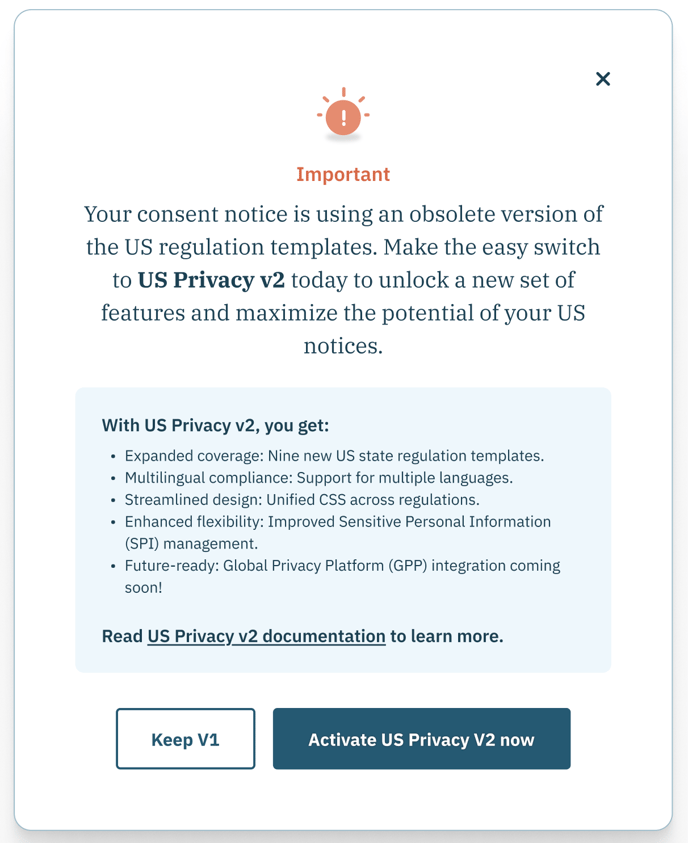
* You will see a migration prompt if your notice is still using V1.
* Click **Activate US Privacy V2 now.**
4. **Test the Updated Notice in Preview Mode:** Before publishing, verify the following:
* **UI Elements:** Ensure all elements display properly under **Customization → Preview** for each regulation.
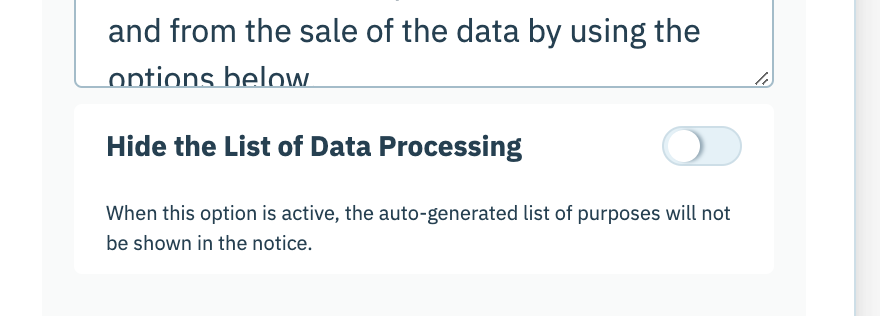
* For example, check that the "data processing section"is not shown for your US notices. To do so, go to **Customization → Content editor → Specific setting → 1st layer and enable "Hide the list of Data Processing" for US regulations.**
* **Custom CSS:** Confirm that your custom CSS styles are applied to all US regulations.
* **Language Support:**
* Enable multiple languages if needed.
* Provide translations for custom text under **Customization → Content Editor.**
* Make sure all your purposes are translated in your selected language: go to **Data Manager → Purposes → Edit purpose.**
* **SPI Purposes:**
* Verify that SPI purposes are listed in the **Preferences Layer (Layer 2).**
* Optionally group SPI purposes into categories under **Regulation → Edit Vendors & Purposes → Purposes.**
5. **Publish the Notice: Once testing is complete, publish your notice.**
***
#### Mobile - How to migrate your notice from v1 to v2?
**Upgrade to the Latest SDK**
To migrate your mobile consent notices to US Privacy V2:
* Simply update your app to the latest version of the Didomi Mobile SDK (*version will be shared soon*).
**Pre-Launch Testing**
Before going live, ensure that the consent notice behaves as expected in your mobile application.
⚠️ **Note:** The list of SPIs will now be part of the preferences layer (layer 2) and will no longer be shown in a separate Layer.
---
# Agent Instructions
This documentation is published with GitBook. GitBook is the documentation platform designed so that both humans and AI agents can read, navigate, and reason over technical content effectively. Learn more at gitbook.com.
## Querying This Documentation
If you need additional information that is not directly available in this page, you can query the documentation dynamically by asking a question.
Perform an HTTP GET request on the current page URL with the `ask` query parameter, and the optional `goal` query parameter:
```
GET https://docs.didomi.io/consent-management-platform-cmp/frameworks-regulations/iab-global-privacy-protocol-gpp/us-privacy-v2.md?ask=&goal=
```
`ask` is the immediate question: it should be specific, self-contained, and written in natural language.
`goal` is optional and describes the broader end goal you are ultimately trying to accomplish on behalf of the user. GitBook uses it to tailor the answer towards what is most useful for that goal.
The response will contain a direct answer to the question and relevant excerpts and sources from the documentation.
Use this mechanism when the answer is not explicitly present in the current page, you need clarification or additional context, or you want to retrieve related documentation sections.