> For the complete documentation index, see [llms.txt](https://docs.didomi.io/llms.txt). Markdown versions of documentation pages are available by appending `.md` to page URLs; this page is available as [Markdown](https://docs.didomi.io/consent-management-platform-cmp/consent-notices/mobile-app-v2-webview.md).
# Mobile app v2 (webview)
**App v2**, also referred to as **Webview CMP**, is Didomi’s next-generation consent experience for mobile applications. Unlike native SDK-based consent UIs, App v2 renders the consent notice in a **webview** using the same engine and configuration as Didomi’s Web CMP, ensuring consistency across web and app platforms.
This solution is ideal for organizations who want **unified styling, behavior, and configuration** across all platforms without maintaining separate implementations for web and mobile.
#### **✅ Benefits of App v2**
* **One configuration, multiple platforms**
Manage your consent notice settings once in the Didomi Console and reuse them across your websites and mobile apps.
* **Unified UI and branding**
Ensure a seamless user experience by displaying the same look & feel between your website and apps.
* **Cross-platform consent**
Combine App v2 with Didomi’s cross-device consent features to offer consistent user choices across devices and platforms.
* **Supports customization**
Benefit from the same customization options available on the web CMP, including custom CSS, translations, legal text, and purpose/vendor configurations.
#### **⚙️ Configuration Steps**
To set up App v2, you’ll need to configure your notice in the Didomi Console and integrate the Webview component in your mobile app.
Minimum App SDK version required:
* Android 2.26.0
* iOS 2.26.0
* Flutter 2.12.0
* React Native 2.12.0
* Unity 2.12.0
**1. In the Didomi Console**
\
**Update existing notice**
You can migrate your native App notices to App v2 following these steps:
1. Go to **Consent Notices > Select your Mobile App**
2. Click on the notice platform to change it:

\
**Create new notice**
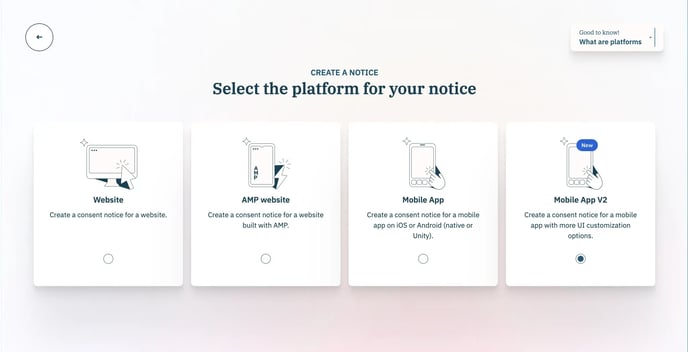
1. Go to **Consent Notices > Create a notice**
2. Select the platform:
* For Webview UI: Select **Mobile App v2**
* For native UI: Select Mobile App
3. Customize your notice.
4. Preview your notice then Publish.
#### **2. In your mobile app**
Your integration with Didomi’s mobile SDKs does not change.
📌 For detailed SDK instructions, see our developer guides for [Android](https://developers.didomi.io/cmp/mobile-sdk/android) and [iOS](https://developers.didomi.io/cmp/mobile-sdk/ios).
#### **❓FAQ**
**How is App v2 different from the native SDK CMP?**
App v2 loads the CMP through a webview rather than rendering it natively. This allows you to reuse your web CMP configuration and ensures visual consistency.
**Is App v2 compatible with TCF v2.2?**
Yes. App v2 fully supports TCF v2.2 and can be configured to work with both IAB and non-IAB vendors.
**What analytics or events are available?**
App v2 supports all standard Didomi events (e.g., onConsentChanged, onNoticeDisplayed) via the webview’s JavaScript bridge or SDK wrappers.
**Is App v2 required for mobile apps going forward?**
No. App v2 is optional. You can continue to use the native CMP SDKs if preferred, or adopt App v2 for a web-like experience.
---
# Agent Instructions
This documentation is published with GitBook. GitBook is the documentation platform designed so that both humans and AI agents can read, navigate, and reason over technical content effectively. Learn more at gitbook.com.
## Querying This Documentation
If you need additional information that is not directly available in this page, you can query the documentation by asking a question.
Perform an HTTP GET request on the following URL with the `ask` and `goal` query parameters:
```
GET https://docs.didomi.io/consent-management-platform-cmp/consent-notices/mobile-app-v2-webview.md?ask=&goal=
```
`ask` is the immediate question: it should be specific, self-contained, and written in natural language.
`goal` is what the user is ultimately trying to achieve, the reason they need the answer. Sharing it helps GitBook give you a better, more relevant answer. A goal is most helpful when it describes the outcome the user wants rather than restating the question. For example, with `ask=how do I create an API token`, a goal like `automate deployments from our CI pipeline` lets GitBook tailor the answer to that use case.
The response will contain a direct answer to the question and relevant excerpts and sources from the documentation.
Use this mechanism when the answer is not explicitly present in the current page, you need clarification or additional context, or you want to retrieve related documentation sections.