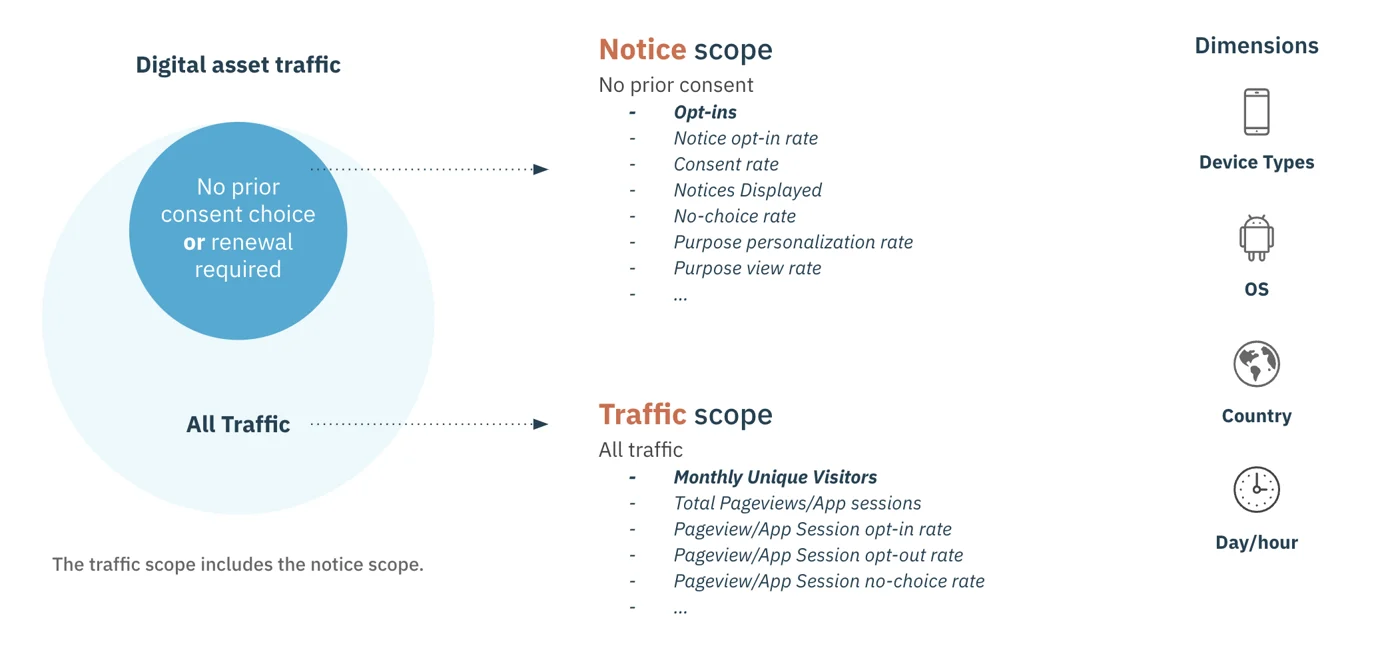
.webp?alt=media&token=c8114157-215c-4dde-a681-a8697575223b)
| Metric/Indicator | Description |
|---|---|
| Total notices | Total number of notices displayed. This metric is not de-duplicated by end-users. If an end-user sees a consent notice multiple times, the consent notice will be counted each time. |
| Opt-ins | Counted each time an end-user accepts at least one purpose and one vendor |
| Opt-outs | Counted each time an end-user rejects consent for all purposes and vendors |
| Total choices | Total number of consent choices made by end-user. It covers opt-in and opt out choices Total choices = opt-ins + opt-outs |
| No choices | Counted each time consent has been asked for but the end-user did not make a selection. That is, when the notice has been displayed but the end-user has not accepted or denied consent. No-choices = total notices - total choices |
| Purposes viewed | Number of end-users (IDs) who have viewed purposes (second layer of the consent notice) |
| Vendors viewed | Number of end-users (IDs) who have viewed vendors (third layer of the consent notice) |
| Purposes changed | Number of end-users (IDs) who have changed at least one purpose (turn-off or turn-on) |
| Vendors changed | Number of end-users (IDs) who have changed at least one vendor (turn-off or turn-on) |
| Acceptance rate | Available in the North America dashboard only and is the percentage of end-users who opt-in (actively made a choice to accept) combined with the percentage of end-users who did not make a choice (passively accepted by not making a choice) across all consent notices Note: External opt-ins and webview opt-ins are not utilized when calculating this metric. |
| Opt-in rate | Percentage of end-users who accepts at least one purpose and one vendor when the consent notice was displayed Note: Opt-in rate is not the same as the consent rate. Click here for more information. Opt-in rate = (opt-ins / total notices) * 100 |
| Opt-in rate lift | Available in the AB Tests dashboard and calculates the percentage change in the opt-in rate between your configured test and control |
| Opt-out rate | Percentage of end-users who rejects consent for all purposes and vendors Opt-out rate = (opt-outs / total notices) * 100 |
| No choice rate | Percentage of end-users who did not accept or deny consent when the notice was been displayed. Click here to learn more. No-choice rate = (no choices / total notices) * 100 |
| Choice rate | Percentage of consents (positive or negative) across the total notices Note: It is the opposite of the consent notice bounce rate. Choice rate = (total choices/total notices) * 100 |
| Consent rate | Percentage of opt-ins among the choices made by end-users when the end-user made a choice in the consent notice Note: Consent rate is not the same as the opt-in rate. Click here for more information. Consent rate = (opt-ins / total choices) * 100 |
| Consent rate lift | Available in the AB Tests dashboard and calculates the percentage change in the consent rate between your configured test and control |
| Refusal rate | Percentage of opt-outs among the choices made by end-users Refusal rate = (opt-outs / total choices) * 100 |
| Vendor view rate | Percentage of end-users who viewed vendors (third layer of the consent notice) Vendor view rate = (vendors viewed / total notices) * 100 |
| Purpose view rate | Percentage of end-users who viewed purposes (second layer of the consent notice) Purpose view rate = (purposes viewed / total notices) * 100 |
| Vendor personalization rate | Percentage of consents with a modified list of vendors Vendor personalization rate = (vendors changed / total choices)*100 |
| Purpose personalization rate | Percentage of consents with a modified list of purposes Purpose personalization rate = (purposes changed / total choices) * 100 |
| External opt-ins | Counted each time an end-user accepts at least one purpose and one vendor outside of the consent notice Note: Metric is not included in opt-in rate calculation. Metric is available Domains & Apps dashboard |
| External opt-outs | Counted when an end-user rejects consent for all purposes and vendors outside of the notice Note: Metric is not included in opt-out rate calculation. Metric is available Domains & Apps dashboard |
| Webview opt-ins | Counted each time an end-user accepts at least one purpose and one vendor selected in a mobile app environment and the end-user choice is automatically pushed to the web environment. Click here for more information. Note: Metric is not included in the opt-in rate calculation. Metric is available in the App Session dashboard |
| Webview opt-outs | Counted when an end-user rejects consent for all purposes and vendors in a mobile app and that user choice is automatically pushed to the web environment. Click here for more information. Note: Metric is not included in the opt-in rate calculation. Metric is available in the App Session dashboard |
| Metric/Indicator | Description |
|---|---|
| Pageviews | Counted each time a web page is loaded and therefore the Didomi CMP web SDK is loaded Note: Pageviews do not directly indicate the total number of unique visitors since a single visitor can generate multiple pageviews by visiting different pages (of the same page multiple times). To estimate the number of unique visitors, Didomi uses a metric called Monthly Unique Visitors (MUVs). Click here for more information. |
| Opt-in pageviews | Number of pageviews with consent (at least one purpose and one vendor) |
| Opt-out pageviews | Number of pageviews where at least one purpose or one vendor is denied and no purposes or vendors are enabled |
| No-choice pageviews | Number of pageviews where notice has been displayed but the end-user has not accepted or denied consent |
| Pageviews without consent | Pageviews without consent = Opt-out pageviews + No-choice pageviews |
| App Sessions | Counted each time a user launches the application and therefore the SDK is loaded |
| Opt-in app sessions | Number of app sessions with consent (at least one purpose and one vendor) |
| Opt-out app sessions | Number of app sessions where at least one purpose or one vendor is denied and no purposes or vendors are enabled |
| No-choice app sessions | Number of app sessions where notice has been displayed but the end-user has not accepted or denied consent |
| App sessions without consent | App sessions without consent = Opt-out app sessions + No-choice app sessions |
| Pageview opt-in rate | Percentage of the pageviews on your website with consent (at least one purpose and one vendor by the user) over the total volume of pageviews Pageview opt-in rate = (pageviews with consent / total pageviews) * 100 |
| App session opt-in rate | Percentage of app sessions with consent (at least one purpose and one vendor) over the total volume of sessions App session opt-in rate = (opt-in app sessions / total app sessions) *100 |
| Pageview opt-out rate | Percentage of pageviews with refusal over the total volume of pageviews Pageview opt-out rate = (pageviews with refusal / total pageviews) * 100 |
| App session opt-out rate | Percentage of the sessions with refusal over the total volume of sessions App session opt-out rate = (sessions with opt-out / total app session) * 100 |
| Pageview no-choice rate | Percentage of pageviews with no choice over the total volume of pageviews Pageview no-choice rate = (pageviews with no choice / total pageviews) * 100 |
| App session no-choice rate | Percentage of the sessions with no choice over the total volume of sessions App session no-choice rate = (no-choice app sessions/ total app sessions) * 100 |