> For the complete documentation index, see [llms.txt](https://docs.didomi.io/llms.txt). Markdown versions of documentation pages are available by appending `.md` to page URLs; this page is available as [Markdown](https://docs.didomi.io/advanced-compliance-monitoring-acm/acm-report-results.md).

# ACM report results

{% hint style="success" %}
**Access Type**: Compliance Report - Editor

**Premium Feature**: Advanced Compliance Monitoring
{% endhint %}

The ACM report offers insight into how your website behaves when accessed, as well as validation that vendors and trackers are also being triggered as expected. In addition to the data available through a traditional tracker and vendor report, Advanced Compliance Monitoring (ACM) adds data and filters related to the different bot scenarios.&#x20;

In this article, we provide an overview of the data included in the following tabs of the compliance report when your organization has the Advanced Compliance Monitoring (ACM) module enabled:

* [Didomi rating ](#didomi-rating)
* [Trackers](#trackers)
* [Vendors](#vendors)
* [Compliance issues](#compliance-issues)
* [Reference: User behaviour calculation](#reference-user-behaviour-calculation)

{% hint style="info" %}
For your convenience, we are presenting below a complete overview of the compliance report below.&#x20;
{% endhint %}

Navigate to a compliance report by clicking **Advanced Compliance Monitoring** on the left-hand panel and selecting **Details** inline with a domain on the subsequent page.

<figure><img src="https://1825037175-files.gitbook.io/~/files/v0/b/gitbook-x-prod.appspot.com/o/spaces%2FNDxbAdc00ce6bH5u1urh%2Fuploads%2FvVysp3vGp4P8Mv15Gll4%2FScreenshot_2026-02-17_at_8_23_09%E2%80%AFAM.jpg?alt=media&amp;token=f0dd426c-5c3b-4143-b7e4-006606cea023" alt="" width="563"><figcaption></figcaption></figure>

***

### Didomi rating

The Didomi rating is a custom assessment made by Didomi that evaluates the domain based on a variety of factors such as:

* trackers have a reasonable lifetime
* presence of a CMP
* presence of a privacy policy
* privacy policy is linked on all pages
* privacy policy provides an opt-out mechanism
* Vendors use the HTTPS protocol

{% hint style="warning" %}
**Note**: The factors used to calculate the Didomi rating can be edited for the Didomi rating.
{% endhint %}

The above factors are given a specific weight in the calculation and produces a score from 0% to 100%.&#x20;

<figure><img src="https://1825037175-files.gitbook.io/~/files/v0/b/gitbook-x-prod.appspot.com/o/spaces%2FNDxbAdc00ce6bH5u1urh%2Fuploads%2FPUUvXb4LIQvTnQm99Lci%2FScreenshot%202026-01-15%20at%202.21.09%E2%80%AFPM.png?alt=media&amp;token=fc450bd9-a1bc-4f8a-bb1f-0b60ebdef720" alt="" width="563"><figcaption></figcaption></figure>

### Trackers

Click the **Trackers** tab to review data on the trackers discovered on the domain for the compliance report.

<figure><img src="https://1825037175-files.gitbook.io/~/files/v0/b/gitbook-x-prod.appspot.com/o/spaces%2FNDxbAdc00ce6bH5u1urh%2Fuploads%2FqIJdv9ZxWekJmjGZPOwT%2FScreenshot%202025-10-30%20at%205.13.38%E2%80%AFPM.png?alt=media&amp;token=7e168ef9-ba56-4a02-a98d-1dc9f5ebaf01" alt="" width="563"><figcaption></figcaption></figure>

The data on the trackers tab can be filtered by the following parameters:&#x20;

<table><thead><tr><th width="130.566650390625">Filter</th><th>Description</th></tr></thead><tbody><tr><td>Vendor</td><td>Requests a tracker to be launched. They have access to the data and are responsible of the data treatment.</td></tr><tr><td>Type</td><td><p>There are four types of trackers:<br></p><ul><li><strong>Cookie</strong> - Small block of data placed on the end-user's device while. Cookies will expire based on their settings. </li><li><strong>Pixel</strong> - an HTML code snippet which is loaded when an end-user visits a website or opens an email. Pixels are useful for tracking end-user behavior and conversions.</li><li><strong>Web storage</strong> - Enables a party to access a local storage object and store data in the browser with no expiration date. Data stored in the browser will persist even after the browser window has been closed.</li><li><strong>Indexed DB</strong> - Client-side storage mechanism within web browsers, designed to allow web applications to store large amounts of structured data locally on the user's device for offline functionality and performance enhancements</li></ul></td></tr><tr><td>Host/domain</td><td>Domain of the tracker</td></tr><tr><td>1st/3rd-party</td><td>Trackers can be categorized into 1st-party or 3rd-party depending on which entity has triggered the dropping of the tracker. If the website itself is dropping a tracker then it will be counted as a 1st-party tracker. A tracker dropped by a vendor will be counted as a 3rd-party tracker.<br><br><mark style="background-color:yellow;"><strong>Note</strong>: Cookies can be created by a vendor (initiator) but still be dropped by the website itself (e.g. tag managers). In this case, the tracker is considered a 1st-party tracker.</mark> </td></tr><tr><td>User behavior</td><td><a href="#reference-user-behaviour-calculation">Click here</a> for more information on how the user behaviour is calculated.</td></tr><tr><td>Actions</td><td>Actions taken that resulted in tracker being dropped</td></tr></tbody></table>

<figure><img src="https://1825037175-files.gitbook.io/~/files/v0/b/gitbook-x-prod.appspot.com/o/spaces%2FNDxbAdc00ce6bH5u1urh%2Fuploads%2Fc0nQAnEwwduIyeeZ4oT6%2FScreenshot%202025-10-31%20at%208.26.38%E2%80%AFAM.png?alt=media&amp;token=dde37a9a-c820-4c38-912c-868268e3eab9" alt="" width="563"><figcaption></figcaption></figure>

For each tracker dropped on the domain in the compliance report Didomi will provide the following information when your organization has Advanced Compliance Monitoring enabled:

<table><thead><tr><th width="187.5167236328125">Field</th><th>Description</th></tr></thead><tbody><tr><td>Tracker name</td><td>Name of the tracker as found on the domain. Click the tracker name to view additional information for the tracker.</td></tr><tr><td>Vendor</td><td>Name of the initiator that launched the tracker</td></tr><tr><td>Type</td><td>Indicates whether the tracker is a cookie, pixel, web storage, or Indexed DB. See filter table above for more information.</td></tr><tr><td>Host/domain</td><td>Domain of the tracker</td></tr><tr><td>1st/3rd party</td><td>Indicates whether the tracker is categorized as a 1st-party or 3rd-party tracker. See filter table above for more information.</td></tr><tr><td>User behaviour</td><td><a href="#reference-user-behaviour-calculation">Click here</a> for more information on how the user behaviour is calculated.</td></tr><tr><td>Actions</td><td>Actions take that resulted in tracker being dropped</td></tr></tbody></table>

### Vendors

Click the **Vendors** tab to review data on the vendors discovered on the domain for the compliance report.

<figure><img src="https://1825037175-files.gitbook.io/~/files/v0/b/gitbook-x-prod.appspot.com/o/spaces%2FNDxbAdc00ce6bH5u1urh%2Fuploads%2FGzZypZgz9G24rQZpTjPu%2FScreenshot%202026-01-15%20at%203.41.16%E2%80%AFPM.png?alt=media&amp;token=f980facc-2b25-4f5f-a6cc-6ac0f49e2f6d" alt="" width="563"><figcaption></figcaption></figure>

The data on the vendors tab can be filtered by the following parameters:&#x20;

<table><thead><tr><th width="149.550048828125">Filter</th><th>Description</th></tr></thead><tbody><tr><td>TCF/Non-TCF</td><td><p>Filters list of vendors into either:<br></p><ul><li>Vendors who belong to the IAB Transparency and Consent Framework (TCF)</li><li>Vendors who do not belong to the IAB Transparency and Consent Framework (TCF)</li></ul></td></tr><tr><td>Processing rule</td><td>Filters list of vendors by the legal bases used</td></tr><tr><td>User behaviour</td><td>Filters list of vendors by the action executed by the Didomi bot when the vendor was triggered.</td></tr></tbody></table>

<figure><img src="https://1825037175-files.gitbook.io/~/files/v0/b/gitbook-x-prod.appspot.com/o/spaces%2FNDxbAdc00ce6bH5u1urh%2Fuploads%2FJjqV6aGBjaUFNmVHWV1s%2FScreenshot%202026-01-15%20at%203.41.44%E2%80%AFPM.png?alt=media&amp;token=1b4637e1-7263-474b-bb63-3c5c49177856" alt="" width="563"><figcaption></figcaption></figure>

For each vendor discovered on the domain in the compliance report Didomi will provide the following information:

<table><thead><tr><th width="202.0333251953125">Field</th><th>Description</th></tr></thead><tbody><tr><td>Name</td><td>Name of the vendor</td></tr><tr><td>Country</td><td>Country where the vendor has its headquarters</td></tr><tr><td>TCF ID</td><td>If vendor is a member of the IAB TCF then Didomi will display the vendor's IAB TCF ID.</td></tr><tr><td>Processing rule</td><td>Legal base used by the vendor</td></tr><tr><td>Requests for tags</td><td>Number of requests that the vendor has performed</td></tr><tr><td>User behavior</td><td><a href="#reference-user-behaviour-calculation">Click here</a> for more information on how the user behaviour is calculated.</td></tr><tr><td>Ran scenario</td><td>Scenario in which the vendor was triggered</td></tr></tbody></table>

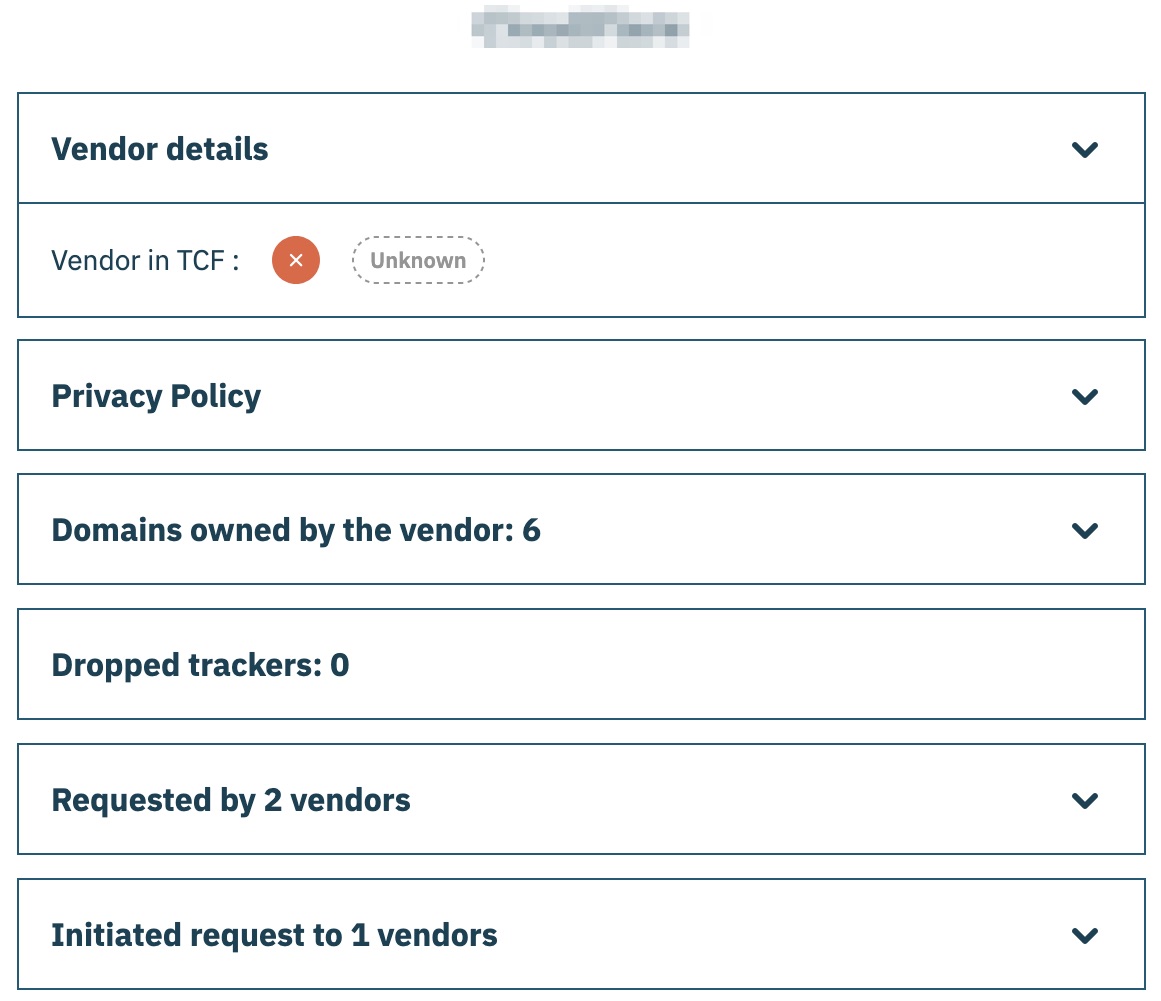
Additional information for a particular vendor can be viewed by clicking the name of the vendor from the list. A subsequent modal will provide the following information for the vendor:

* Whether vendor is a member of the IAB TCF
* Privacy policy
* Domains owned by the vendor according to the Didomi database
* Trackers dropped by the vendor on your domain
* Vendors who requested this particular vendor
* Vendors who were initiated by this particular vendor

<figure><img src="https://1825037175-files.gitbook.io/~/files/v0/b/gitbook-x-prod.appspot.com/o/spaces%2FNDxbAdc00ce6bH5u1urh%2Fuploads%2FD2xCPPHYdpXkqDB1qhZc%2FScreenshot_2025-10-31_at_10_19_13%E2%80%AFAM.jpg?alt=media&amp;token=2ce9286e-9559-4928-a60c-c6e5601f28ac" alt="" width="375"><figcaption></figcaption></figure>

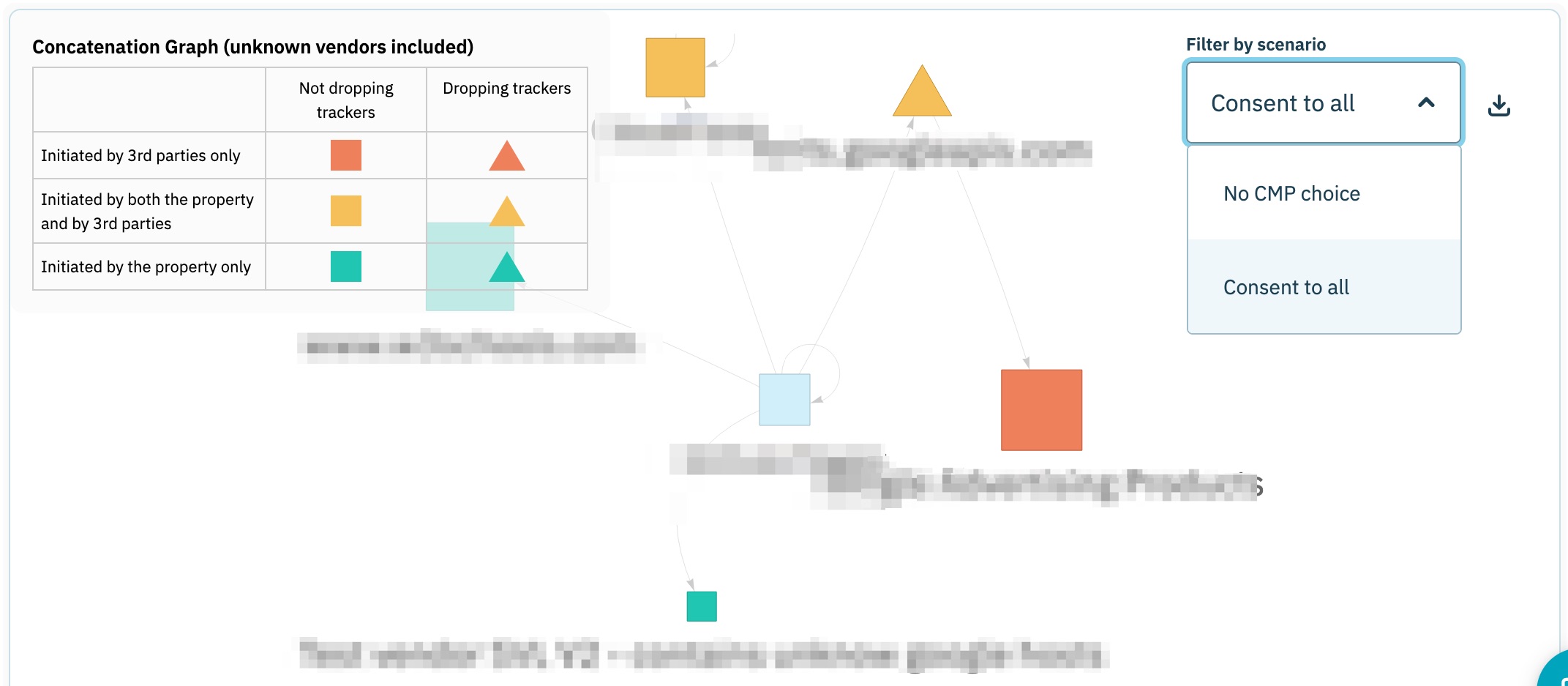
In addition to the table view of vendors found on the domain, Didomi also provides an interactive graph that visualizes how vendors are being requested on the domain. Select any vendor on the graph to highlight how it is called on your domain and which vendors it subsequently calls on your domain.

{% hint style="info" %}
The graph also includes a filter that enables your organization to filter the visualization by scenario.
{% endhint %}

<figure><img src="https://1825037175-files.gitbook.io/~/files/v0/b/gitbook-x-prod.appspot.com/o/spaces%2FNDxbAdc00ce6bH5u1urh%2Fuploads%2FHD7gZ2KPcOMU3Dj7AEHo%2FScreenshot_2026-01-15_at_3_53_51%E2%80%AFPM.jpg?alt=media&amp;token=65445ec3-2a26-4809-8b98-27e4c9ca0103" alt="" width="563"><figcaption></figcaption></figure>

### Compliance issues

For every compliance report generated on a domain Didomi will catalogue any potential problems as it pertains to GDPR compliance in the **Compliance issues** tab of the report. These issues and recommendations are based on Didomi's extensive knowledge of the data privacy landscape but should **not** be taken as legal advice. Rather, use the catalogued issues and recommendations as a starting point with your Data Protection Officer (DPO) before taking any action.

Click the **Compliance issues** tab to review the issues catalogued for the compliance report.&#x20;

{% hint style="info" %}
Expand the accordion for certain compliance issues for more detailed information.
{% endhint %}

<figure><img src="https://1825037175-files.gitbook.io/~/files/v0/b/gitbook-x-prod.appspot.com/o/spaces%2FNDxbAdc00ce6bH5u1urh%2Fuploads%2FWMM6v7BAINqsGpkBOoAl%2FScreenshot_2025-10-29_at_3_32_27%E2%80%AFPM.jpg?alt=media&amp;token=77e01e3a-0a70-4bbe-9460-83246a96f65e" alt="" width="563"><figcaption></figcaption></figure>

<table><thead><tr><th width="310.3499755859375">Issues</th><th>Description</th></tr></thead><tbody><tr><td>No CMP was detected on the website</td><td>Did not encounter a consent management platform (CMP) to provide end-user consent. </td></tr><tr><td>A Privacy Policy wasn't found on your website</td><td>Could not locate the privacy policy on the website</td></tr><tr><td>The Privacy Policy is not accessible from every page of the website</td><td><p>Unable to access your organization's privacy policy on at least one page for the domain. </p><div data-gb-custom-block data-tag="hint" data-style="warning" class="hint hint-warning"><p><strong>Note</strong>: This issue does not mean the privacy policy does not exist on the page but that the bot was unable to detect it during the scraping session. This issue can arise from how your privacy policy is worded.</p></div></td></tr><tr><td>The privacy policy does not seem to provide a way to opt out</td><td>Unable to find a link/button in the privacy policy that allows an end-user to manage their consent preferences.</td></tr><tr><td>Number of trackers that have lifetime longer than 13 months which is not recommended by GDPR</td><td>Discovered cookies dropped on domain with lifetimes exceeding 13 months. Ask the vendor dropping the cookies to reduce the lifetime of the cookie to to delete it completely. <a href="/tracker-and-vendor-discovery/tracker-and-vendor-discovery-results/review-cookie-lifetime.md">Click here</a> to learn more.</td></tr><tr><td>Number of vendors or initiators that are unknown to our database, review them to be sure they are legit</td><td>Vendor or initiator found on domain is not known in the Didomi database. Avoid this issue in future discoveries by manually matching the vendor. <a href="/tracker-and-vendor-discovery/tracker-and-vendor-discovery-results/match-unknown-vendors.md">Click here</a> for more information.</td></tr><tr><td>A Cookie Policy wasn’t found</td><td>Unable to find cookie policy on domain.</td></tr><tr><td>The Privacy Policy doesn't state how long personal data is kept or the criteria used to determine the period</td><td>Policy doesn't disclose the data retention period or criteria</td></tr><tr><td>The Privacy Policy doesn't state the recipients, or categories of recipients, of personal data</td><td>Policy doesn't disclose who data is shared with</td></tr><tr><td>The Privacy Policy doesn't inform users of their data protection rights</td><td>Policy doesn't inform users of their data-protection rights</td></tr><tr><td>The consent notice doesn't provide a clear way to opt-out</td><td>No reachable refusal option in the consent banner at any tier</td></tr><tr><td>The consent notice doesn’t provide information about purposes and vendors</td><td>Unable to find information about vendors and purposes your organization uses to process end-user data in the consent notice.</td></tr><tr><td>No opt-out link was found in the website footer</td><td>No link exists to reopen the consent notice after a choice is made</td></tr><tr><td>The vendor count is not displayed in the first layer, making it unclear how many partners have access to user data</td><td>Consent notice's first layer doesn't state a vendor count</td></tr><tr><td>Vendors listed as undisclosed</td><td>Vendors actually detected on the site aren't all disclosed in the consent notice</td></tr><tr><td>Number of trackers dropped despite user not making a choice</td><td>Discovered trackers on domain when the end-user did not make a consent decision.</td></tr><tr><td>Number of trackers dropped despite user refusing consent</td><td>Discovered trackers on domain when the end-user explicitly refused consent.</td></tr><tr><td>Not all CMP API required commands returned a correct response</td><td>IAB <code>__tcfapi</code> doesn't correctly respond to <code>ping</code>/<code>addEventListener</code>/<code>removeEventListener</code></td></tr><tr><td>Correct the GVL version format in your CMP to match TCF specifications (should be an integer)</td><td>GVL version isn't formatted as a valid positive integer</td></tr><tr><td>Your CMP is not using the current or penultimate version of the GVL. Update your CMP</td><td>GVL version is more than one release behind IAB's current list</td></tr><tr><td>TCF purposes 1, 3, 4, 5, and/or 6 are incorrectly configured for legitimate interest. Per TCF policy, these purposes cannot use legitimate interest as a legal basis</td><td>TCF-forbidden purposes are being processed under legitimate interest instead of requiring consent</td></tr><tr><td>The 'Created' and 'LastUpdated' timestamps in your CMP are not consistent</td><td>Consent string's <code>LastUpdated</code> didn't advance past <code>Created</code> after a user's choice — a stale consent record</td></tr><tr><td>Vendor signals for deleted/removed vendors are not set to 0 in your consent string.</td><td>Consent string still carries an active signal for a vendor that's been removed from the GVL</td></tr><tr><td>A GPC confirmation message was not found on the website.</td><td>Site doesn't show a confirmation message acknowledging the browser's GPC signal</td></tr><tr><td>The GPC well-known endpoint was not found.</td><td>No GPC policy published at <code>/.well-known/gpc.json</code></td></tr><tr><td>No working GPP API (<code>__gpp</code>) was found, or the GPP section for the selected state is not loaded.</td><td><code>__gpp</code> does not answer the required commands, or no applicable section is loaded.</td></tr><tr><td>Your CMP is not prominently displayed and/or does not cover most of the website content when displayed.</td><td>The notice is not prominent enough.</td></tr><tr><td>There is no direct link to the list of third parties in the first layer of your CMP interface.</td><td>The first layer has no direct link to the vendor list.</td></tr><tr><td>Your CMP interface lacks clear calls to action for consent and customization, or buttons have been hidden/removed.</td><td>The accept and customize buttons are not clear and visible.</td></tr><tr><td>The first layer doesn’t mention that partners will store and/or access information on users’ devices.</td><td>The first layer does not disclose device storage and access.</td></tr><tr><td>The first layer doesn’t mention that personal data will be processed by third parties.</td><td>The first layer does not disclose third-party processing of personal data.</td></tr><tr><td>The CMP doesn’t provide specific examples of what personal data is collected (e.g., IP address, device ID, browsing behavior).</td><td>The notice names no concrete data types.</td></tr><tr><td>Configure your CMP so all consent toggles (purposes and vendors) default to ‘off’ state. Only legitimate interest purposes may be pre-selected with an opt-out option. Never pre-select consent-based purposes or vendors.</td><td>Some consent-based purposes or vendors are on before any choice is made.</td></tr><tr><td>Users cannot review vendors, purposes, and legal bases in detail, or the granular choice interface has been disabled.</td><td>Users can not consent per purpose and per vendor.</td></tr></tbody></table>

### Reference: User behavior calculation

Refer to the table below for how Didomi calculates the value for the **User behaviour** field within the compliance report tabs:

<table><thead><tr><th width="477">Conditions</th><th>User behaviour</th></tr></thead><tbody><tr><td>Tracker/vendor present only in an <strong>Accept</strong> <strong>all</strong> scenario</td><td>Consent to all</td></tr><tr><td>Tracker/vendor present only in a <strong>Refuse all</strong> scenario</td><td>Refuse to all</td></tr><tr><td>Tracker/vendor present in <strong>Refuse all</strong> and <strong>Accept all</strong> scenarios</td><td>Refuse to all</td></tr><tr><td>Tracker/vendor present only in <strong>No action</strong> scenario</td><td>No CMP choice</td></tr><tr><td>Tracker/vendor present only in <strong>No action</strong> and <strong>Accept all</strong> scenarios</td><td>No CMP choice</td></tr><tr><td>Tracker/vendor present in <strong>No action</strong> and <strong>Refuse all</strong> scenarios</td><td>No CMP choice</td></tr></tbody></table>


---

# Agent Instructions
This documentation is published with GitBook. GitBook is the documentation platform designed so that both humans and AI agents can read, navigate, and reason over technical content effectively. Learn more at gitbook.com.

## Querying This Documentation
If you need additional information that is not directly available in this page, you can query the documentation by asking a question.

Perform an HTTP GET request on the following URL with the `ask` and `goal` query parameters:

```
GET https://docs.didomi.io/advanced-compliance-monitoring-acm/acm-report-results.md?ask=<question>&goal=<user_goal>
```

`ask` is the immediate question: it should be specific, self-contained, and written in natural language.
`goal` is what the user is ultimately trying to achieve, the reason they need the answer. Sharing it helps GitBook give you a better, more relevant answer. A goal is most helpful when it describes the outcome the user wants rather than restating the question. For example, with `ask=how do I create an API token`, a goal like `automate deployments from our CI pipeline` lets GitBook tailor the answer to that use case.

The response will contain a direct answer to the question and relevant excerpts and sources from the documentation.

Use this mechanism when the answer is not explicitly present in the current page, you need clarification or additional context, or you want to retrieve related documentation sections.