> For the complete documentation index, see [llms.txt](https://docs.didomi.io/llms.txt). Markdown versions of documentation pages are available by appending `.md` to page URLs; this page is available as [Markdown](https://docs.didomi.io/advanced-compliance-monitoring-acm/acm-report-domains/bot-scenarios.md).

# Bot scenarios

{% hint style="success" %}
**Premium Feature**: Advanced Compliance Monitoring or XL Scans
{% endhint %}

Advanced Compliance Monitoring (ACM) provides your organization with up to three scenarios that the Didomi bot will scan for when generating a compliance report (your XL Scan is restricted to only a single scenario). In this article we will cover:

* [Default bot scenarios](#default-bot-scenarios)
* [Custom bot scenarios](#custom-bot-scenarios)
* [Activate/Deactivate bot scenarios](#activate-deactivate-bot-scenarios)
* [Delete bot scenarios](#delete-bot-scenarios)

***

### Default bot scenarios

Every ACM report comes loaded with the following default bot scenarios:

<table><thead><tr><th width="186">Default scenario</th><th>Description</th></tr></thead><tbody><tr><td>Accept all</td><td>Will locate and click the action to accept all purposes from the first layer of the consent notice. </td></tr><tr><td>Refuse all</td><td>Will locate and click the action to reject all purposes from the first layer of the consent notice. </td></tr><tr><td>No actions</td><td>Will perform no actions on the consent notice and/or domain</td></tr><tr><td>GPC signal</td><td>Will browse and perform any instructions with the Global Privacy Control (GPC) signal enabled</td></tr></tbody></table>

<figure><img src="https://1825037175-files.gitbook.io/~/files/v0/b/gitbook-x-prod.appspot.com/o/spaces%2FNDxbAdc00ce6bH5u1urh%2Fuploads%2FeDDb4AUZpct1pnNMKb6g%2FScreenshot%202026-09-04%20at%2011.52.23%E2%80%AFAM.png?alt=media&amp;token=e4a2ded5-7546-423d-8243-51084f867bcb" alt="" width="563"><figcaption></figcaption></figure>

{% hint style="info" %}
Default bot scenarios can be further customized to handle different use cases, for example, in the case where your [refuse all button is only present on the second layer](/advanced-compliance-monitoring-acm/acm-report-domains/bot-scenarios/customize-bot-scenario.md#use-case) of your consent notice or if your organization utilizes a [multi-step login form](/advanced-compliance-monitoring-acm/acm-report-domains/scan-domain-that-requires-login.md#multi-step-login) for the domain being scanned.
{% endhint %}

### Custom bot scenarios

In addition to the provided default bot scenarios, your organization can create fully customized bot scenarios. [Click here](/advanced-compliance-monitoring-acm/acm-report-domains/bot-scenarios/customize-bot-scenario.md) for more information on how to customize a bot scenario.

Your organization can add up to three custom bot scenarios.

### Activate/Deactivate bot scenarios

Regardless of how many scenarios your organization configures for the report, the Didomi bot only executes scenarios that are set to **Active** by your organization. In this section, we will cover how to activate or deactivate a bot scenario.

{% hint style="warning" %}
**Note**: The number of active scenarios allowed in a report is dependent on whether your organization is creating a Classic or XL Scan.

* **ACM (Classic)**: total of three active scenarios (default and/or custom)
* **ACM (XL)**: one active scenario (default or custom) &#x20;
  {% endhint %}

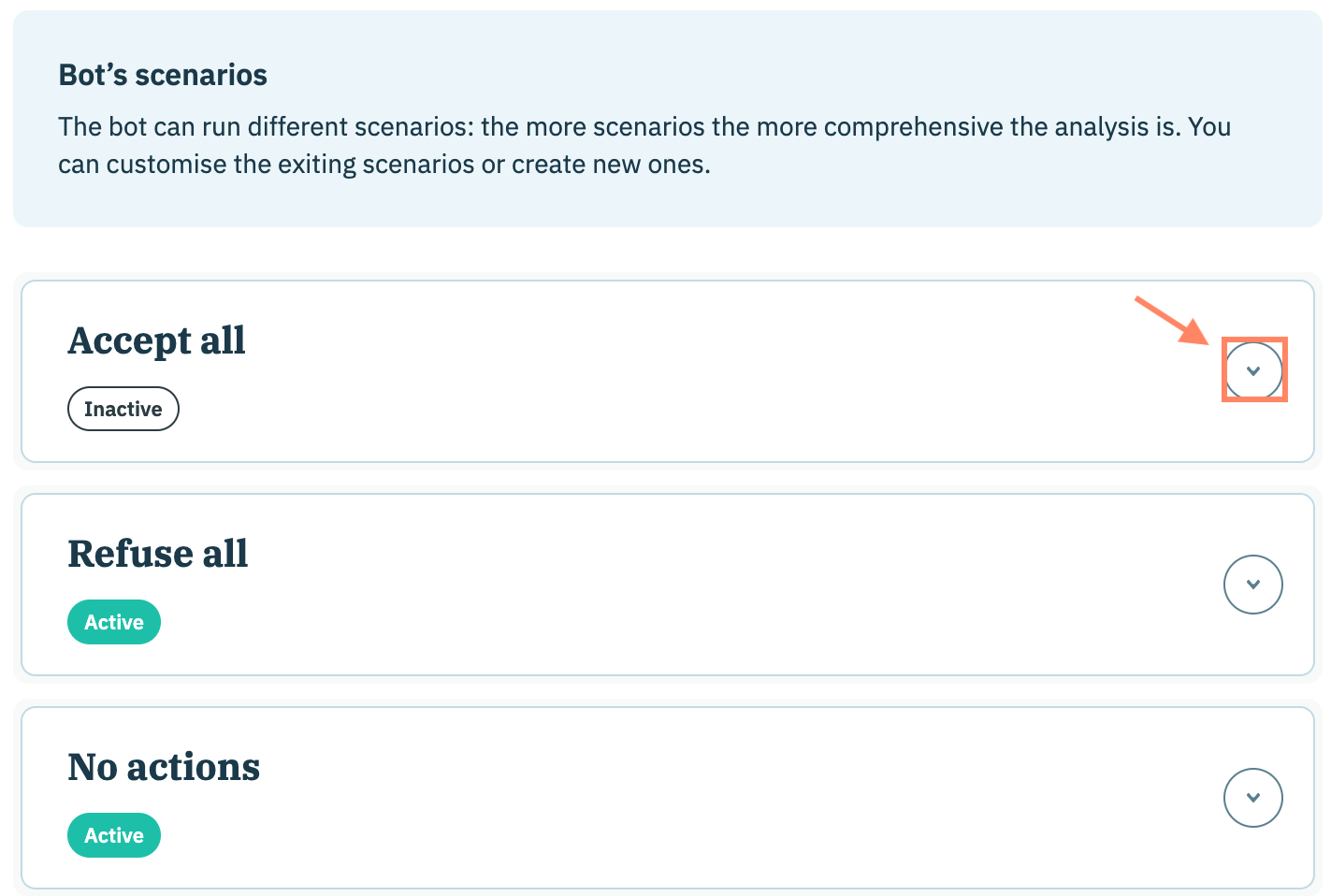
Navigate to the **Bot's scenarios** section of your compliance report configuration and expand the accordion for a scenario.

<figure><img src="https://1825037175-files.gitbook.io/~/files/v0/b/gitbook-x-prod.appspot.com/o/spaces%2FNDxbAdc00ce6bH5u1urh%2Fuploads%2FrFgLBekbuOtNOfjpi6Mc%2FScreenshot%202026-01-14%20at%203.34.59%E2%80%AFPM.png?alt=media&amp;token=ba560fc0-34d1-4162-a987-c1da9baf1662" alt="" width="563"><figcaption></figcaption></figure>

Select/deselect the **Enable this scenario** checkbox to activate/deactivate the bot scenario.

{% hint style="info" %}
If your organization already has 3 active scenarios then you will be unable to set another scenario as activate.
{% endhint %}

<figure><img src="https://1825037175-files.gitbook.io/~/files/v0/b/gitbook-x-prod.appspot.com/o/spaces%2FNDxbAdc00ce6bH5u1urh%2Fuploads%2FpWmWS8Bvmri1afpO1EWD%2FScreenshot%202026-06-09%20at%202.36.59%E2%80%AFPM.png?alt=media&amp;token=36c0a62c-05ab-4739-87b7-b04f4813b284" alt="" width="563"><figcaption></figcaption></figure>

### Delete bot scenarios

{% hint style="info" %}
Default bot scenarios cannot be deleted but they can be [deactivated](#activate-deactivate-bot-scenarios).
{% endhint %}

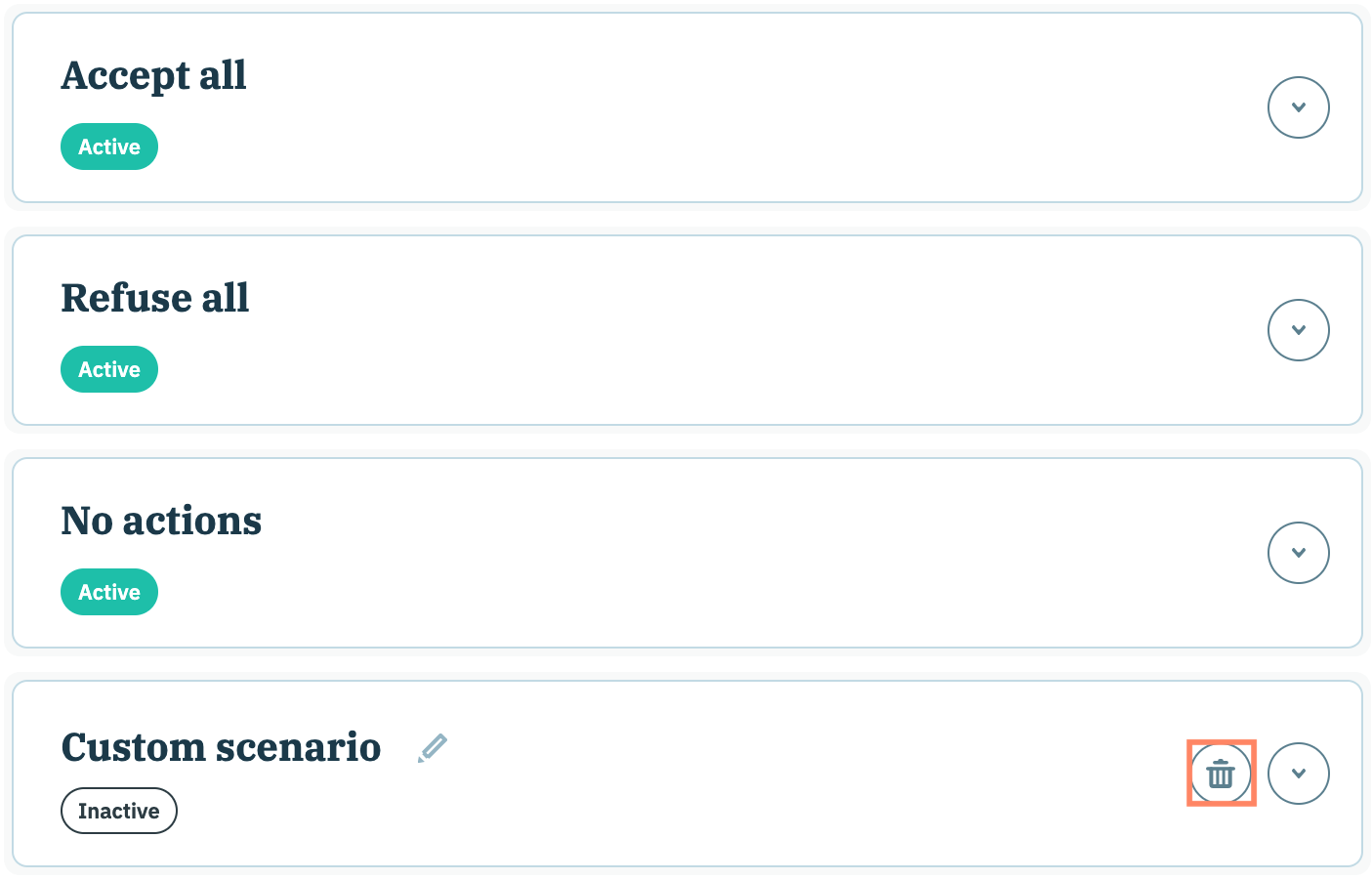
In order to delete a custom bot scenario, navigate to the **Bot's scenarios** section of your compliance report configuration and click the **Delete** icon inline with the custom bot scenario name.

<figure><img src="https://1825037175-files.gitbook.io/~/files/v0/b/gitbook-x-prod.appspot.com/o/spaces%2FNDxbAdc00ce6bH5u1urh%2Fuploads%2FxqFsXNjW0Kl9lRpo6ylR%2FScreenshot%202026-01-14%20at%203.43.10%E2%80%AFPM.png?alt=media&amp;token=e8ca4484-1ca0-4a32-b25f-058565cd2624" alt="" width="563"><figcaption></figcaption></figure>

The custom bot scenario will be deleted from the compliance report.


---

# Agent Instructions
This documentation is published with GitBook. GitBook is the documentation platform designed so that both humans and AI agents can read, navigate, and reason over technical content effectively. Learn more at gitbook.com.

## Querying This Documentation
If you need additional information that is not directly available in this page, you can query the documentation by asking a question.

Perform an HTTP GET request on the following URL with the `ask` and `goal` query parameters:

```
GET https://docs.didomi.io/advanced-compliance-monitoring-acm/acm-report-domains/bot-scenarios.md?ask=<question>&goal=<user_goal>
```

`ask` is the immediate question: it should be specific, self-contained, and written in natural language.
`goal` is what the user is ultimately trying to achieve, the reason they need the answer. Sharing it helps GitBook give you a better, more relevant answer. A goal is most helpful when it describes the outcome the user wants rather than restating the question. For example, with `ask=how do I create an API token`, a goal like `automate deployments from our CI pipeline` lets GitBook tailor the answer to that use case.

The response will contain a direct answer to the question and relevant excerpts and sources from the documentation.

Use this mechanism when the answer is not explicitly present in the current page, you need clarification or additional context, or you want to retrieve related documentation sections.